
#FactCheck-Bangladesh Video Falsely Shared as Security Forces Action During West Bengal Elections 2026
Executive Summary
As West Bengal heads for vote counting on May 4, 2026, following the second phase of Assembly polling held on April 29, a video is being widely shared on social media. The clip shows security personnel baton-charging civilians, with users claiming it depicts force being used during the West Bengal Assembly Elections 2026. Research by CyberPeace Research Wing found that the viral claim is misleading. The video is actually from Bangladesh and is being falsely linked to the West Bengal elections to spread confusion.
Claim
A Facebook user named “Adv Mohd Salman” shared the clip on April 29, 2026, using Bengal-related hashtags and claiming that voters standing in line were beaten to influence the election outcome. The post alleged that free and fair voting rights were being suppressed.

Fact Check
To verify the claim, we closely examined the viral video. A vehicle visible in the footage had a registration number written in a non-Hindi script. Using Google Lens reverse image search, we found a matching image uploaded on Alamy on December 30, 2018. The image showed a military vehicle with the same script and registration style seen in the viral clip.
According to the description on the platform, the image was taken in Dhaka during Bangladesh’s national elections and showed Bangladeshi army personnel moving through a street near a polling station. This confirms that the viral footage is not related to the 2026 West Bengal Assembly elections.

Conclusion
Our research confirms that the video showing security personnel baton-charging civilians is from Bangladesh, not West Bengal. It is being falsely shared as footage from the 2026 West Bengal Assembly elections to mislead users.

Related Blogs

Introduction
The mysteries of the universe have been a subject of curiosity for humans over thousands of years. To solve these unfolding mysteries of the universe, astrophysicists are always busy, and with the growing technology this seems to be achievable. Recently, with the help of Artificial Intelligence (AI), scientists have discovered the depths of the cosmos. AI has revealed the secret equation that properly “weighs” galaxy clusters. This groundbreaking discovery not only sheds light on the formation and behavior of these clusters but also marks a turning point in the investigation and discoveries of new cosmos. Scientists and AI have collaborated to uncover an astounding 430,000 galaxies strewn throughout the cosmos. The large haul includes 30,000 ring galaxies, which are considered the most unusual of all galaxy forms. The discoveries are the first outcomes of the "GALAXY CRUISE" citizen science initiative. They were given by 10,000 volunteers who sifted through data from the Subaru Telescope. After training the AI on 20,000 human-classified galaxies, scientists released it loose on 700,000 galaxies from the Subaru data.
Brief Analysis
A group of astronomers from the National Astronomical Observatory of Japan (NAOJ) have successfully applied AI to ultra-wide field-of-view images captured by the Subaru Telescope. The researchers achieved a high accuracy rate in finding and classifying spiral galaxies, with the technique being used alongside citizen science for future discoveries.
Astronomers are increasingly using AI to analyse and clean raw astronomical images for scientific research. This involves feeding photos of galaxies into neural network algorithms, which can identify patterns in real data more quickly and less prone to error than manual classification. These networks have numerous interconnected nodes and can recognise patterns, with algorithms now 98% accurate in categorising galaxies.
Another application of AI is to explore the nature of the universe, particularly dark matter and dark energy, which make up over 95% energy of the universe. The quantity and changes in these elements have significant implications for everything from galaxy arrangement.
AI is capable of analysing massive amounts of data, as training data for dark matter and energy comes from complex computer simulations. The neural network is fed these findings to learn about the changing parameters of the universe, allowing cosmologists to target the network towards actual data.
These methods are becoming increasingly important as astronomical observatories generate enormous amounts of data. High-resolution photographs of the sky will be produced from over 60 petabytes of raw data by the Vera C. AI-assisted computers are being utilized for this.
Data annotation techniques for training neural networks include simple tagging and more advanced types like image classification, which classify an image to understand it as a whole. More advanced data annotation methods, such as semantic segmentation, involve grouping an image into clusters and giving each cluster a label.
This way, AI is being used for space exploration and is becoming a crucial tool. It also enables the processing and analysis of vast amounts of data. This advanced technology is fostering the understanding of the universe. However, clear policy guidelines and ethical use of technology should be prioritized while harnessing the true potential of contemporary technology.
Policy Recommendation
- Real-Time Data Sharing and Collaboration - Effective policies and frameworks should be established to promote real-time data sharing among astronomers, AI developers and research institutes. Open access to astronomical data should be encouraged to facilitate better innovation and bolster the application of AI in space exploration.
- Ethical AI Use - Proper guidelines and a well-structured ethical framework can facilitate judicious AI use in space exploration. The framework can play a critical role in addressing AI issues pertaining to data privacy, AI Algorithm bias and transparent decision-making processes involving AI-based tech.
- Investing in Research and Development (R&D) in the AI sector - Government and corporate giants should prioritise this opportunity to capitalise on the avenue of AI R&D in the field of space tech and exploration. Such as funding initiatives focusing on developing AI algorithms coded for processing astronomical data, optimising telescope operations and detecting celestial bodies.
- Citizen Science and Public Engagement - Promotion of citizen science initiatives can allow better leverage of AI tools to involve the public in astronomical research. Prominent examples include the SETI @ Home program (Search for Extraterrestrial Intelligence), encouraging better outreach to educate and engage citizens in AI-enabled discovery programs such as the identification of exoplanets, classification of galaxies and discovery of life beyond earth through detecting anomalies in radio waves.
- Education and Training - Training programs should be implemented to educate astronomers in AI techniques and the intricacies of data science. There is a need to foster collaboration between AI experts, data scientists and astronomers to harness the full potential of AI in space exploration.
- Bolster Computing Infrastructure - Authorities should ensure proper computing infrastructure should be implemented to facilitate better application of AI in astronomy. This further calls for greater investment in high-performance computing devices and structures to process large amounts of data and AI modelling to analyze astronomical data.
Conclusion
AI has seen an expansive growth in the field of space exploration. As seen, its multifaceted use cases include discovering new galaxies and classifying celestial objects by analyzing the changing parameters of outer space. Nevertheless, to fully harness its potential, robust policy and regulatory initiatives are required to bolster real-time data sharing not just within the scientific community but also between nations. Policy considerations such as investment in research, promoting citizen scientific initiatives and ensuring education and funding for astronomers. A critical aspect is improving key computing infrastructure, which is crucial for processing the vast amount of data generated by astronomical observatories.
References
- https://mindy-support.com/news-post/astronomers-are-using-ai-to-make-discoveries/
- https://www.space.com/citizen-scientists-artificial-intelligence-galaxy-discovery
- https://www.sciencedaily.com/releases/2024/03/240325114118.htm
- https://phys.org/news/2023-03-artificial-intelligence-secret-equation-galaxy.html
- https://www.space.com/astronomy-research-ai-future

Executive Summary
A post claiming to be a statement by BJP MP Kangana Ranaut regarding the NEET paper leak is going viral on social media. The post allegedly quotes her as saying:“Hindus are in danger here and you are worried about the NEET exam. If Hindus do not exist, who will take the NEET exam?” The CyberPeace Research Wing research found this claim to be fake. Kangana Ranaut herself has also denied the viral post through her official X (formerly Twitter) account.
Claim
A user on X shared the viral graphic and wrote that Hindus are in danger and questioned the relevance of the NEET exam, further linking it to political criticism of the BJP government.

Fact Check
During the research, keyword-based searches revealed no credible reports linking Kangana Ranaut to any such statement regarding NEET paper leaks or Hindus. We also reviewed Kangana Ranaut’s official social media accounts. On May 20, 2026, she tagged Congress leader Surendra Singh Rajput in an X post and clearly termed the viral statement as fake. She also criticized Rajput and the Congress party over the spread of misinformation. Notably, Surendra Rajput later deleted his original post.

On May 21, Rajput reposted Kangana’s clarification, stating that after her denial it was clear that the poster and statement were not hers. He also said he had deleted his post. Under his post, a user shared screenshots of the deleted content.

Conclusion
Our research confirms that Kangana Ranaut has not made any such statement related to the NEET paper leak or Hindus. The viral claim is fake.

Executive Summary:
After the reported attacks by Israel and the United States on Iran, a video allegedly showing footballer Cristiano Ronaldo has been widely circulated on social media. In the clip, Ronaldo appears to be holding a Palestinian flag and chanting “Free Palestine.” Several users are sharing the video with the claim that Ronaldo waved the Palestinian flag and raised “Free Palestine” slogans after the death of Iran’s Supreme Leader Ali Khamenei. However, a research by CyberPeace found that the claim is false. The viral clip does not depict a real event and has been generated using artificial intelligence. The fabricated video is being shared online with misleading claims.
Claim
An Instagram user “ham_313_ka_admi” shared the viral video on March 2, 2026. The text on the video reads: “Cristiano Ronaldo waved the Palestinian flag after Khamenei’s death. Mashallah. Free Palestine.”
Fact Check:
To verify the claim, we searched Google using relevant keywords but found no credible news reports supporting the viral claim. We also reviewed the official social media accounts of Cristiano Ronaldo, where no such video or statement was posted. This raised suspicion that the clip might be AI-generated.
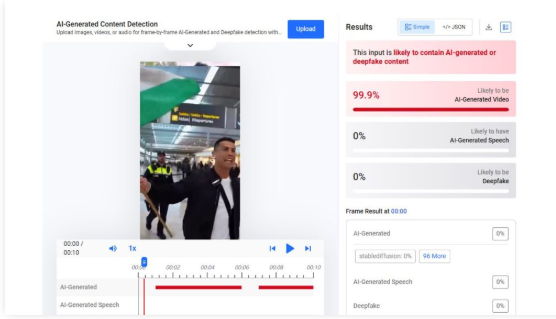
To further examine the video, we analyzed it using AI detection tools. The tool Hive Moderation indicated a 99.9% probability that the video was created using artificial intelligence.
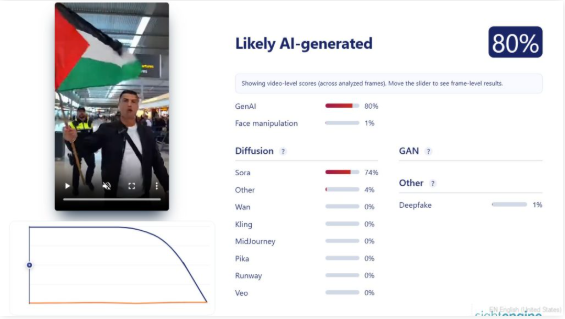
We also analyzed the footage using the Sightengine AI detection tool. The results suggested an 80% likelihood that the video was AI-generated. The tool also indicated that the clip may have been created using Sora, an AI video-generation tool.
Conclusion
The viral video claiming that Cristiano Ronaldo waved the Palestinian flag and chanted “Free Palestine” after the death of Ali Khamenei is AI-generated. It does not depict a real incident and is being shared with a misleading claim.
