
#FactCheck : AI Video Falsely Shows Iran Destroying Israeli Military Base
Executive Summary
Amid the ongoing conflict involving the US-Israel and Iran in West Asia, a video showing destroyed aircraft at an airport is going viral on social media. The clip is being shared with the claim that it shows an Israeli military base destroyed in an Iranian attack. However, an research by the CyberPeacen found that the viral video is not real but AI-generated.
Claim:
An Instagram user “sakirali8064” shared the video on March 22, 2026, claiming that Iran had demonstrated its military strength by deploying advanced missiles capable of long-range precision strikes.The video also carries a “Breaking News” overlay stating:“Iran attack Israel military base… the entire base destroyed.
Post link and archive link:

Fact Check:
To verify the claim, we extracted keyframes from the viral clip and conducted a reverse image search using Google Lens. We found a longer version of the same video posted on March 5, 2026, by a Facebook user named “With INC,” where it was also falsely linked to an Iranian attack on Israel’s Ben Gurion Airport.

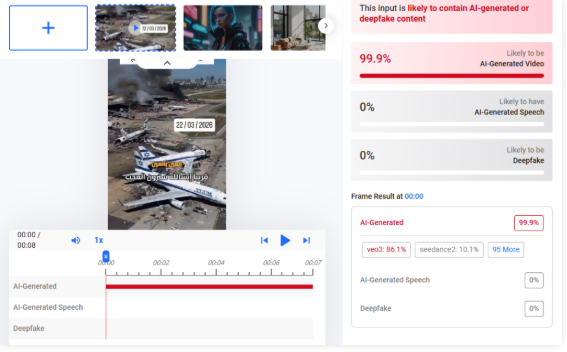
Upon closely examining the video, we observed inconsistencies such as fire changing positions unnaturally, which raised suspicion of AI manipulation. We then analyzed the video using Hive Moderation, which indicated a probability of over 99% that the content is AI-generated.
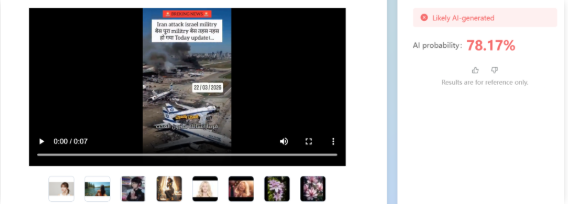
Additionally, analysis using Tencent’s “Zhuque AI” detection tool suggested more than 78% likelihood of the video being AI-generated.
Conclusion:
The viral video claiming that an Iranian attack destroyed an Israeli military base is AI-generated and misleading. While Iran has claimed to have targeted Israel’s Ben Gurion International Airport using drones, the viral footage does not depict a real event.

Related Blogs
.webp)
Introduction
The rise of misinformation, disinformation, and synthetic media content on the internet and social media platforms has raised serious concerns, emphasizing the need for responsible use of social media to maintain information accuracy and combat misinformation incidents. With online misinformation rampant all over the world, the World Economic Forum's 2024 Global Risk Report, notably ranks India amongst the highest in terms of risk of mis/disinformation.
The widespread online misinformation on social media platforms necessitates a joint effort between tech/social media platforms and the government to counter such incidents. The Indian government is actively seeking to collaborate with tech/social media platforms to foster a safe and trustworthy digital environment and to also ensure compliance with intermediary rules and regulations. The Ministry of Information and Broadcasting has used ‘extraordinary powers’ to block certain YouTube channels, X (Twitter) & Facebook accounts, allegedly used to spread harmful misinformation. The government has issued advisories regulating deepfake and misinformation, and social media platforms initiated efforts to implement algorithmic and technical improvements to counter misinformation and secure the information landscape.
Efforts by the Government and Social Media Platforms to Combat Misinformation
- Advisory regulating AI, deepfake and misinformation
The Ministry of Electronics and Information Technology (MeitY) issued a modified advisory on 15th March 2024, in suppression of the advisory issued on 1st March 2024. The latest advisory specifies that the platforms should inform all users about the consequences of dealing with unlawful information on platforms, including disabling access, removing non-compliant information, suspension or termination of access or usage rights of the user to their user account and imposing punishment under applicable law. The advisory necessitates identifying synthetically created content across various formats, and instructs platforms to employ labels, unique identifiers, or metadata to ensure transparency.
- Rules related to content regulation
The Information Technology (Intermediary Guidelines and Digital Media Ethics Code) Rules, 2021 (Updated as on 6.4.2023) have been enacted under the IT Act, 2000. These rules assign specific obligations on intermediaries as to what kind of information is to be hosted, displayed, uploaded, published, transmitted, stored or shared. The rules also specify provisions to establish a grievance redressal mechanism by platforms and remove unlawful content within stipulated time frames.
- Counteracting misinformation during Indian elections 2024
To counter misinformation during the Indian elections the government and social media platforms made their best efforts to ensure the electoral integrity was saved from any threat of mis/disinformation. The Election Commission of India (ECI) further launched the 'Myth vs Reality Register' to combat misinformation and to ensure the integrity of the electoral process during the general elections in 2024. The ECI collaborated with Google to empower the citizenry by making it easy to find critical voting information on Google Search and YouTube. In this way, Google has supported the 2024 Indian General Election by providing high-quality information to voters and helping people navigate AI-generated content. Google connected voters to helpful information through product features that show data from trusted institutions across its portfolio. YouTube showcased election information panels, featuring content from authoritative sources.
- YouTube and X (Twitter) new ‘Notes Feature’
- Notes Feature on YouTube: YouTube is testing an experimental feature that allows users to add notes to provide relevant, timely, and easy-to-understand context for videos. This initiative builds on previous products that display helpful information alongside videos, such as information panels and disclosure requirements when content is altered or synthetic. YouTube clarified that the pilot will be available on mobiles in the U.S. and in the English language, to start with. During this test phase, viewers, participants, and creators are invited to give feedback on the quality of the notes.
- Community Notes feature on X: Community Notes on X aims to enhance the understanding of potentially misleading posts by allowing users to add context to them. Contributors can leave notes on any post, and if enough people rate the note as helpful, it will be publicly displayed. The algorithm is open source and publicly available on GitHub, allowing anyone to audit, analyze, or suggest improvements. However, Community Notes do not represent X's viewpoint and cannot be edited or modified by their teams. A post with a Community Note will not be labelled, removed, or addressed by X unless it violates the X Rules, Terms of Service, or Privacy Policy. Failure to abide by these rules can result in removal from accessing Community Notes and/or other remediations. Users can report notes that do not comply with the rules by selecting the menu on a note and selecting ‘Report’ or using the provided form.
CyberPeace Policy Recommendations
Countering widespread online misinformation on social media platforms requires a multipronged approach that involves joint efforts from different stakeholders. Platforms should invest in state-of-the-art algorithms and technology to detect and flag suspected misleading information. They should also establish trustworthy fact-checking protocols and collaborate with expert fact-checking groups. Campaigns, seminars, and other educational materials must be encouraged by the government to increase public awareness and digital literacy about the mis/disinformation risks and impacts. Netizens should be empowered with the necessary skills and ability to discern fact and misleading information to successfully browse true information in the digital information age. The joint efforts by Government authorities, tech companies, and expert cyber security organisations are vital in promoting a secure and honest online information landscape and countering the spread of mis/disinformation. Platforms must encourage netizens/users to foster appropriate online conduct while using platforms and abiding by the terms & conditions and community guidelines of the platforms. Encouraging a culture of truth and integrity on the internet, honouring differing points of view, and confirming facts all help to create a more reliable and information-resilient environment.
References:
- https://www.meity.gov.in/writereaddata/files/Advisory%2015March%202024.pdf
- https://blog.google/intl/en-in/company-news/outreach-initiatives/supporting-the-2024-indian-general-election/
- https://blog.youtube/news-and-events/new-ways-to-offer-viewers-more-context/
- https://help.x.com/en/using-x/community-notes

Introduction
The hospitality industry is noted to be one of the industries most influenced by technology. Hotels, restaurants, and travel services are increasingly reliant on digital technologies to automate core operations and customer interactions. The shift to electronic modes of conducting business has made the industry a popular target for cyber threats. In light of increasing cyber threats, safeguarding personal and sensitive personal data on the part of the hospitality industry becomes significant not only from a customer standpoint but also from an organisational and legal perspective.
Role of cybersecurity in the hospitality industry
A hospitality industry-based entity (“HI entity”) deploys several technologies not only to automate operations but to also deliver excellent customer experiences. Technologies such as IoTs that enable smart controls in rooms, Point-of-Sale systems that manage reservations, Call Accounting Systems that track and record customer calls, keyless entry systems, and mobile apps that facilitate easy booking and service requests are popularly used in addition to operative technologies such as Property Management Systems, Hotel Accounting Systems, Local Area Networks (LAN).{1} These technologies collect vast volumes of data daily due to the nature of operations. Such data necessarily includes personal information such as names, addresses, phone numbers, email IDs etc. and sensitive information such as gender, bank account and payment details, health information pertaining to food allergens etc. Resultantly, the breach and loss of such critical data impacts customer trust and loyalty and in turn, their retention within the business. Lack of adequate cybersecurity measures also impacts the reputation and goodwill of an HI entity since customers are more likely to opt for establishments that prioritise the protection of their data. In 2022, cybercriminals syphoned 20GB of internal documents and customer data from Marriott Hotels, which included credit card information and staff information such as wage data, corporate card number and even a personnel assessment file. A much larger breach was seen in 2018, where 383 million booking records and 5.3 million unencrypted passport numbers were stolen from Marriott’s servers.{2}
Cybersecurity is also central to safeguarding trade secrets and key confidential trade information. An estimate of US $6 trillion per year on average amounts to losses generated from cybercrimes.{3} The figure, however, does not include the cost of breach, expenses related to incident response, legal fees, regulatory fines etc which may be significantly higher for a HI entity when loss of potential profits is factored in.
Cybersecurity is also central from a legal standpoint. Legal provisions in various jurisdictions mandate the protection of guest data. In India, the Digital Personal Data Protection Act 2023, imposes a penalty of up to Rs. 50 Crores on a breach in observing obligations to take reasonable security safeguards to prevent personal data breach.{4} Similarly, the General Data Protection Regulation (GDPR) of the European Union also has guidelines for protecting personal data. Several other industry-specific rules, such as those pertaining to consumer protection, may also be applicable.
Breaches and Mitigation
There are several kinds of cyber security threats faced by an HI entity. “Fake Booking” is a popular method of cyber attack, whereby attackers build and design a website that is modelled exactly after the hotel’s legitimate website. Many customers end up using such malicious phishing websites thereby exposing their personal and sensitive personal data to threats. Additionally, the provision of free wifi within hotel premises, usually accessible freely to the public, implies that a malicious actor may introduce viruses and updates bearing malware. Other common cyber threats include denial of service (DoS) attacks, supply chain attacks, ransomware threats, SQL injection attacks (a type of attack where malicious code is inserted into a database to manipulate data and gain access to information), buffer overflow or buffer overrun (when the amount of data exceeds its storage capacity, implying that the excess data overflows into other memory locations and corrupt or overwrites data in those locations).
One of the best ways to manage data breaches is to leverage newer technologies that operate on a “privacy by design” model. An HI entity must deploy web application firewalls (WAF) that differ from regular firewalls since they can filter the content of specific web applications and prevent cyber attacks. Another method to safeguard data is by deploying a digital certificate which binds a message/instruction to the owner/generator of the message. This is useful in preventing any false claims fraud by customers. Digital certificates may be deployed on distributed ledger technologies such as blockchain, that are noted for their immutability, transparency and security. Self-sovereign identities or Identifiers (SSI) are also a security use-concept of blockchain whereby individuals own and control their personal data, thereby eliminating reliance on central authorities.{5} In the hospitality industry, SSIs enhance cybersecurity by securely storing identity-related information on a decentralised network, thereby reducing the risk of data breaches. Users can selectively share their information, ensuring privacy and minimising data exposure. This approach not only protects guests' personal details but also streamlines authentication processes, making interactions safer and more efficient.
From a less technical standpoint, cybersecurity insurance may be opted for by a hotel to secure themselves and customer information against breach. Through such insurance, a hotel may cover the liability that arises from breaches caused by both first- and third-party actions.{6} Additionally, Payment Cards Industry Data Security Standards should be adhered to, since these standards ensure that businesses should apply best practices when processing credit card data through optimised security. Employee training and upskilling in basic, practical cybersecurity measures and good practices is also a critical component of a comprehensive cybersecurity strategy.
References:
- [1] The Growing Importance of Cybersecurity in the Hospitality Industry”, Alfatec, 11 September 2023 https://www.alfatec.ai/academy/resource-library/the-growing-importance-of-cybersecurity-in-the-hospitality-industry
- [2] Vigliarolo, Brandon, “Marriott Hotels admit to third data breach in 4 years”, 6 July 2022 https://www.theregister.com/2022/07/06/marriott_hotels_suffer_yet_another/#:~:text=In%20the%20case%20of%20the,of%20an%20individual%20organization%20ever.
- [3] Shabani, Neda & Munir, Arslan. (2020). A Review of Cyber Security Issues in the Hospitality Industry. 10.1007/978-3-030-52243-8_35. https://www.researchgate.net/publication/342683038_A_Review_of_Cyber_Security_Issues_in_Hospitality_Industry/citation/download
- [4] The Digital Personal Data Protection Act 2023 https://www.meity.gov.in/writereaddata/files/Digital%20Personal%20Data%20Protection%20Act%202023.pdf
- [5] “What is self-sovereign identity?”, Sovrin, 6 December 2018 https://sovrin.org/faq/what-is-self-sovereign-identity/
- [6] Yasar, Kinza, “Cyber Insurance”, Tech Target https://www.techtarget.com/searchsecurity/definition/cybersecurity-insurance-cybersecurity-liability-insurance
.webp)
Introduction
Autonomous transportation, smart cities, remote medical care, and immersive augmented reality are just a few of the revolutionary applications made possible by the global rollout of 5G technology. However, along with this revolution in connectivity, a record-breaking rise in vulnerabilities and threats has emerged, driven by software-defined networks, growing attack surfaces, and increasingly complex networks. As work on next-generation 6G networks accelerates, with commercialisation starting in 2030, security issues are piling up, including those related to AI-driven networks, terahertz communications, and quantum computing attacks. For a nation like India, poised to become a global technological leader, next-generation network procurement is not merely a technical necessity but a strategic imperative. Initiatives such as India-UK collaboration on telecom security in recent years say a lot about how international alliances are the order of the day to address these challenges.
Why Cybersecurity in 5G and 6G Networks is Crucial
With the launch of global 5G services and the rapid introduction of 6G technologies, the telecom sector is seeing a fundamental transformation. Besides expanding connectivity, future networks are also creating the building blocks for networked and highly intelligent environments. With its ultra-high speed of 10 Gbps, network slicing, and ultra-low latency, 5G provides new capabilities that are perfectly suited for mission-critical applications such as telemedicine, autonomous vehicles, and industrial IoT. Sixth-generation wireless technology is still in development, and it will be approximately one hundred times faster than fifth-generation. Here are a few drawbacks and challenges:
- Decentralised Infrastructure (edge computing nodes): Increased number of entry points for attack.
- Virtual Network Functions (VNFs): Greater vulnerability to configuration issues and software exploitation.
- Billions of IoT devices with different security states, thus forming networks that are more difficult to secure.
Although these challenges are unparalleled, the advancement in technology also creates new opportunities.
Understanding the Cyber Threat Landscape for 5G and 6G
The move to 5G and the upgrade to 6G open great opportunities, but also open doors for new cybersecurity risks. Open RAN usage offers flexibility and vendor selection but exposes the supply chain to untested third-party components and attacks. SBA security vulnerabilities can be exploited to disrupt vital network services, resulting in outages or data breaches. Similarly, widespread adoption of edge computing to reduce latency creates multiple entry points for an attacker to target. Compounding the problem is the explosion of IoT device connections through 5G, which, if breached, can fuel massive botnets capable of conducting massive distributed denial-of-service (DDoS) attacks.
Challenges in 6G
- AI-Powered Cyberattacks: AI-native 6G networks are susceptible to adversarial machine learning attacks, data model poisoning, both for security and for traffic optimisation.
- Quantum Threats: Post-quantum cryptography may be required if quantum computing renders current encryption algorithms outdated.
- Privacy Concerns with Digital Twins: 6G may result in creating enormous privacy and data protection issues in addition to offering real-time virtual replicas of the physical world.
- Cross-Border Data Flow Risks: Secure interoperability frameworks and standardised data sovereignty are essential for the worldwide rollout of 6G.
A Critical Step Toward Secure Telecom: The India-UK Partnership
India's recent foray with the UK reflects its active role in shaping the future of telecom security. Major points of the UK-India Telecom Roundtable are:
- MoU between SONIC Labs and C-DOT: Dedicated to Open RAN and AI integration security in 4G/5G deployments. This will offer supply chain diversity without sacrificing resilience.
- Research Partnerships for 6G: Partnerships with UK institutions like CHEDDAR (Cloud & Distributed Computing Hub) and the University of Glasgow 6G Research Centre are focused on developing AI-driven network security solutions, green 6G, and quantum-resistant design.
- Telecom Cybersecurity Centres of Excellence: Constructing two-way CoEs for telecom cybersecurity, ethical AI, and digital twin security models.
- Standardisation Efforts: Joint contribution to ITU for the creation of IMT-2030 standards, in a way that cybersecurity-by-design principles are integrated into worldwide 6G specifications.
- Future Initiatives:
- Application of privacy-enhancing technologies (PETs) for cross-sectoral data usage.
- Secure quantum communications to be used for satellite and submarine cable connections.
- Encouragement of native telecommunication stacks for strategic independence.
Global Policy and Regulatory Aspects
- India's Bharat 6G Vision: India will lead the global standardisation process in the Bharat 6G Alliance with a vision of inclusive, secure, and sustainable connectivity.
- International Harmonisation:
- 3GPP and ITU's joint effort towards standardisation of 6G security.
- Cross-border privacy and cybersecurity compliance system designs to enable secure flows of data.
- Cyber Diplomacy for Telecom Security: Cross-border sharing of information architectures, threat intelligence sharing, and coordinated incident response schemes are essential to 6G security resilience globally.
Building a Secure and Resilient Future for 5G and 6G
Establishing a safe and future-proof 5G and 6G environment should be an end-to-end effort involving governments, industry, and technology vendors. Security should be integrated into the underlying architecture of the networks and not an afterthought feature to be optionally provided. Active engagement in international bodies to establish homogeneous security and privacy standards across geographies is also required. Public-private partnerships, including academia partnerships, will be the driver for innovation and the creation of advanced protection mechanisms. Simultaneously, creating a competent talent pool to manage AI-based threat analysis, quantum-resistant cryptography, and next-generation cryptographic methods will be required to combat the advanced menace of new telecom technologies.
Conclusion
Given 6G on the way and 5G technologies already changing global connections, cybersecurity needs to continue to be a key focus. The partnership between India and the UK serves as an example of why the safe rise of tomorrow's networks depends on global collaboration, AI-driven security measures, plus quantum preparedness. The world can unleash the potential for transformation of 5G and 6G through combining security by design, supporting international standards, and encouraging innovation via cooperation. This will result in an online future that is not only quick and egalitarian but also solid and trustworthy.
References:
- https://www.pib.gov.in/PressReleasePage.aspx?PRID=2105225
- https://www.itu.int/en/ITU-R/study-groups/rsg5/rwp5d/imt-2030/pages/default.aspx
- https://dot.gov.in/sites/default/files/Bharat%206G%20Vision%20Statement%20-%20full.pdf
- https://www.gsma.com/solutions-and-impact/technologies/security/wp-content/uploads/2024/07/FS.40-v3.0-002-19-July.pdf
