
#FactCheck-AI-Generated Video Fake Claims Waterlogging Inside Noida International Airport Terminal
Executive Summary
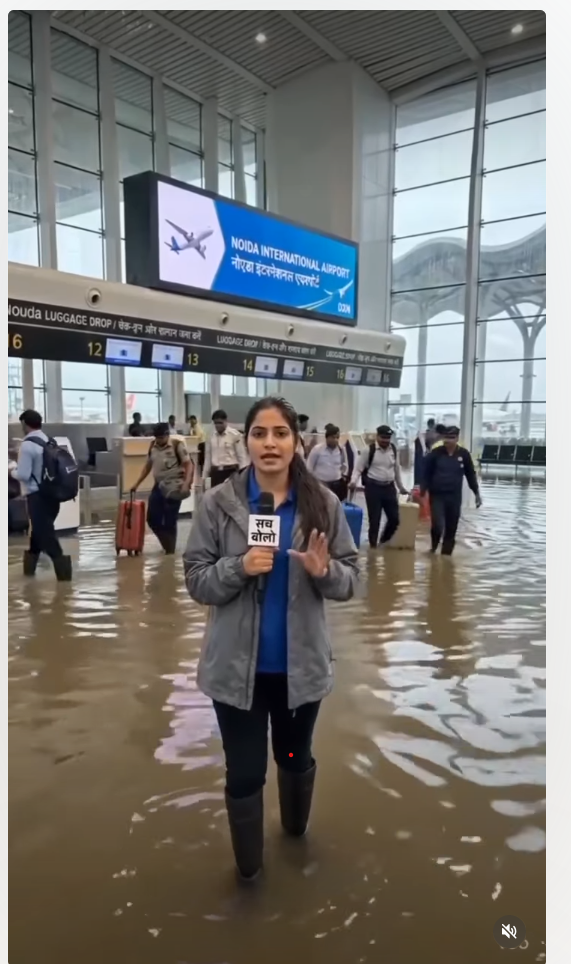
A video circulating rapidly on social media claims to show severe waterlogging inside the passenger terminal of the newly constructed Noida International Airport in Uttar Pradesh. The clip displays passengers navigating flooded check-in areas with their luggage, while a female reporter holding a mic labeled "Sach Bolo" criticizes the state government over poor infrastructure. However, a research by the CyberPeace Research Wing confirmed that the video is completely fake and created using artificial intelligence (AI).
The Claim
On August 14, 2026, Instagram user shyamgupta_yuvaneta posted the clip with a caption targeting the government over alleged corruption and poor infrastructure at the Noida Airport
https://www.instagram.com/reels/DcAOGgcgUrp
Fact-Check
An initial analysis of the video revealed unnatural physical movements among the people shown and an artificial voice modulation typical of AI-generated content. To verify this, the video was run through standard AI detection tools:
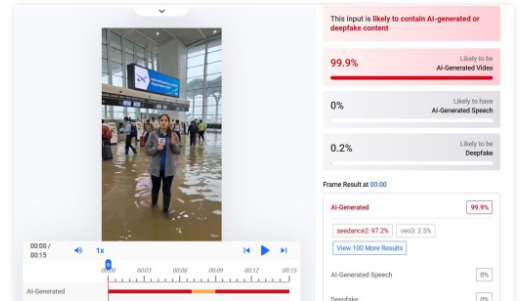
Hive Moderation: Flagged the video as 99.9% likely to be AI-generated.
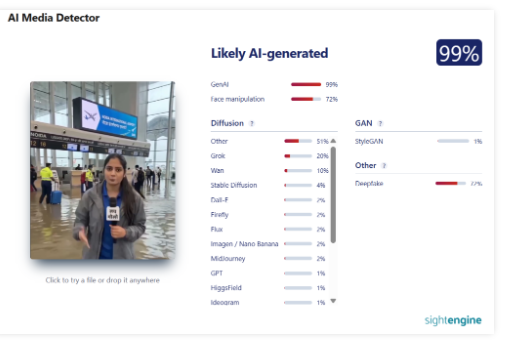
Sightengine: Returned a 99% probability that the content was artificially generated.
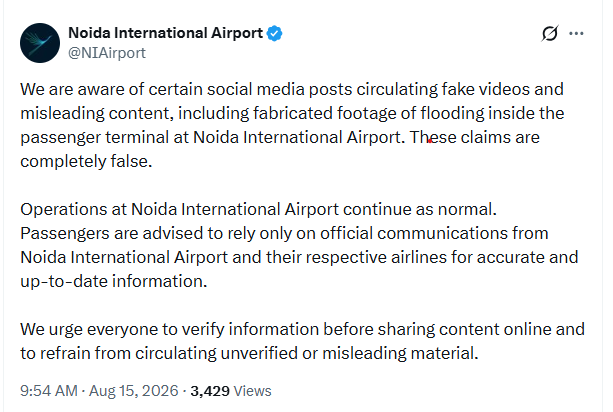
Further verification of official communications revealed a post by the official X (formerly Twitter) account of Noida International Airport (@NIAirport) on August 15, 2026. The airport authority clarified that fake videos depicting waterlogging inside the passenger terminal were circulating online and refuted the claims entirely. While recent heavy rainfall did cause temporary water accumulation in an underpass connecting the terminal to the parking area, the passenger terminal building itself remained unaffected.
https://x.com/NIAirport/status/2088481969462272065?s=20
Conclusion
The viral video showing waterlogging inside the Noida International Airport terminal is fake and AI-generated. The actual incident of waterlogging was restricted to an outer subway connecting the parking area, not the main terminal building.

Related Blogs

Introduction
Since the inception of the Internet and social media platforms like Facebook, X (Twitter), Instagram, etc., the government and various other stakeholders in both foreign jurisdictions and India have looked towards the intermediaries to assume responsibility for the content floated on these platforms, and various legal provisions showcase that responsibility. For the first time in many years, these intermediaries come together to moderate the content by setting a standard for the creators and propagators of this content. The influencer marketing industry in India is at a crucial juncture, with its market value projected to exceed Rs. 3,375 crore by 2026. But every industry is coupled with its complications; like in this scenario, there is a section of content creators who fail to maintain the standard of integrity and propagate content that raises concerns of authenticity and transparency, often violating intellectual property rights (IPR) and privacy.
As influencer marketing continues to shape digital consumption, the need for ethical and transparent content grows stronger. To address this, the India Influencer Governing Council (IIGC) has released its Code of Standards, aiming to bring accountability and structure to the fast-evolving online space.
Bringing Accountability to the Digital Fame Game
The India Influencer Governing Council (IIGC), established on 15th February, 2025, is founded with the objective to empower creators, advocate for fair policies, and promote responsible content creation. The IIGC releases the Code of Standard, not a moment too soon; it arrives just in time, a necessary safeguard before social media devolves into a chaotic marketplace where anything and everything is up for grabs. Without effective regulation, digital platforms become the marketplace for misinformation and exploitation.
The IIGC leads the movement with clarity, stating that the Code is a significant piece that spans across 20 crucial sections governing key areas such as paid partnership disclosures, AI-generated personas, content safety, and financial compliance.
Highlights from the Code of Standard
- The Code exhibits a technical understanding of the industry of content creation and influencer marketing. The preliminary sections advocate for accuracy, transparency, and maintaining credibility with the audience that engages with the content. Secondly, the most fundamental development is with regard to the “Paid Partnership Disclosure” included in Section 2 of the Code that mandates disclosure of any material connection, such as financial agreements or collaboration with the brand.
- Another development, which potently comes at a befitting hour, is the disclosure of “AI Influencers”, which establishes that the nature of the influencer has to be disclosed, and such influencers, whether fully virtual or partially AI-enhanced, must maintain the same standards as any human influencer.
- The code ranges across various other aspects of influencer marketing, such as expressing unpaid “Admiration” for the brand and public criticism of the brand, being free from personal bias, honouring financial agreements, non-discrimination, and various other standards that set the stage for a safe and fair digital sphere.
- The Code also necessitates that the platform users and the influencers handle sexual and sensitive content with sincere deliberation, and usage of such content shall be for educational and health-related contexts and must not be used against community standards. The Code includes various other standards that work towards making digital platforms safer for younger generations and impressionable minds.
A Code Without Claws? Challenges in Enforcement
The biggest obstacle to the effective implementation of the code is distinguishing between an honest promotion and a paid brand collaboration without any explicit mention of such an agreement. This makes influencer marketing susceptible to manipulation, and the manipulation cannot be tackled with a straitjacket formula, as it might be found in the form of exaggerated claims or omission of critical information.
Another hurdle is the voluntary compliance of the influencers with the advertising standards. Influencer marketing is an exercise in a borderless digital cyberspace, where the influencers often disregard the dignified standards to maximise their earnings and commercial motives.
The debate between self-regulation and government oversight is constantly churning, where experience tells us that overreliance on self-regulation has proven to be inadequate, and succinct regulatory oversight is imperative in light of social media platforms operating as a transnational commercial marketplace.
CyberPeace Recommendations
- Introduction of a licensing framework for influencers that fall into the “highly followed” category with high engagement, who are more likely to shape the audience’s views.
- Usage of technology to align ethical standards with influencer marketing practices, ensuring that misleading advertisements do not find a platform to deceive innocent individuals.
- Educating the audience or consumers on the internet about the ramifications of negligence and their rights in the digital marketplace. Ensuring a well-established grievance redressal mechanism via digital regulatory bodies.
- Continuous and consistent collaboration and cooperation between influencers, brands, regulators, and consumers to establish an understanding and foster transparency and a unified objective to curb deceptive advertising practices.
References
- https://iigc.org/code-of-standards/influencers/code-of-standards-v1-april.pdf
- https://legalonus.com/the-impact-of-influencer-marketing-on-consumer-rights-and-false-advertising/
- https://exhibit.social/news/india-influencer-governing-council-iigc-launched-to-shape-the-future-of-influencer-marketing/

Executive Summary
A video is being shared on social media with the claim that a thief in Indore, Madhya Pradesh, performed dangerous stunts to evade the police. In the viral video, several police personnel can be seen chasing a man. The man appears to dodge vehicles on the road to escape the police and then climbs onto the roof of a moving bus. He later jumps from the bus and climbs onto a roadside hoarding. The video is being shared with the claim that a clever thief gave the police a tough time in Indore. Research by CyberPeace Research Wing found that the video is AI-generated and is being shared with a misleading claim.
Claim:
A high-voltage, filmy-style chase between police and a clever thief took place in a busy market in Indore. The police later surrounded the accused and detained him. Archive of the post can be seen here. Similar posts can be seen here and here.
https://www.facebook.com/reel/1356598853312128

Fact Check:
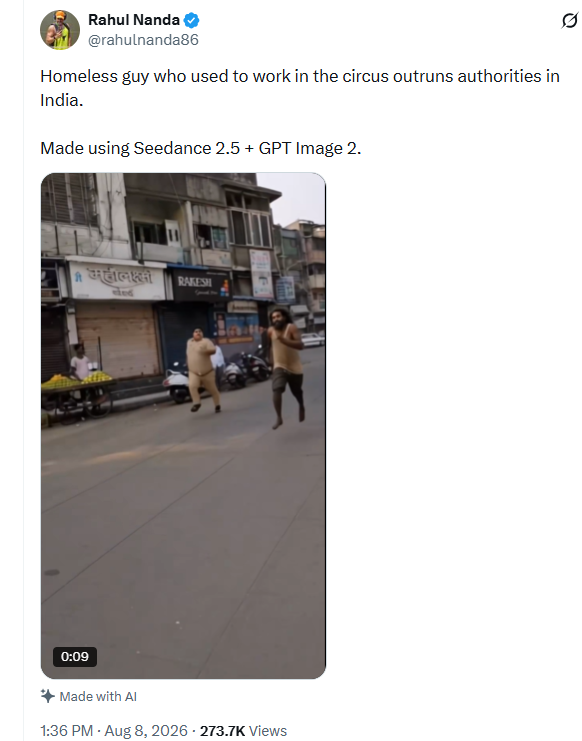
To verify the claim, we conducted a reverse image search of keyframes from the viral video using Google Lens. During the search, we found the same video posted on August 8 on the X account of a user named Rahul Nanda. The post stated that the video had been created using AI.
https://x.com/rahulnanda86/status/2086001127762657614
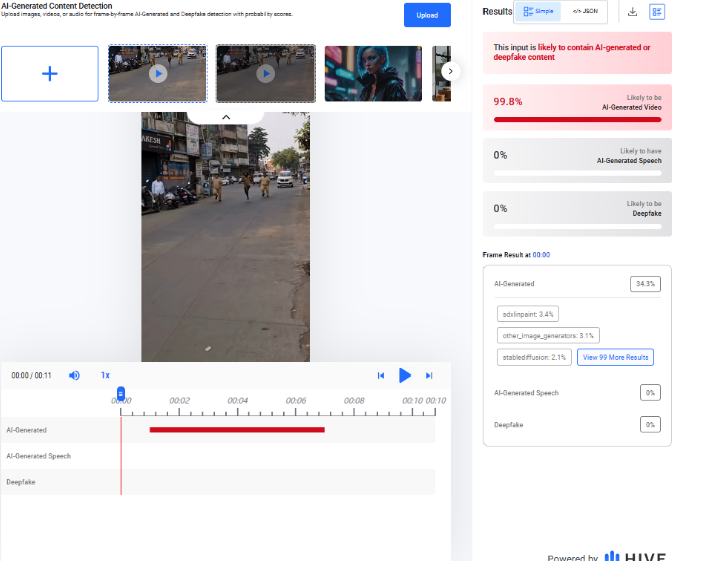
We then analysed the viral video using the AI detection tool Hive Moderation. The tool gave the video a 99.8 per cent score for being potentially AI-generated.
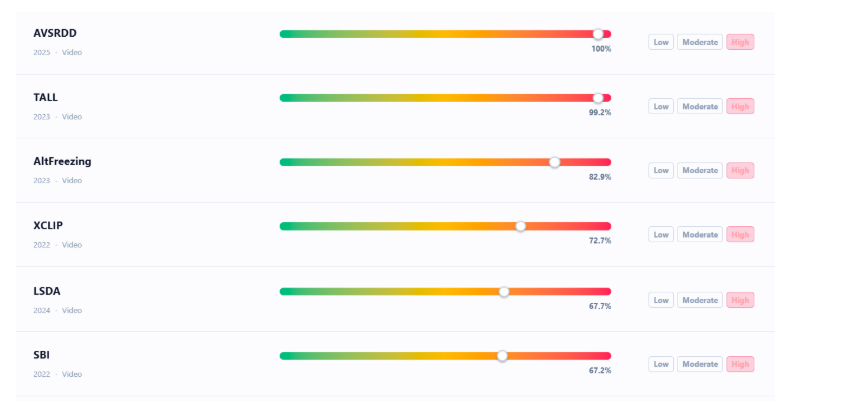
As part of the research, we also checked the video using another AI detection tool, Deepfake-O-Meter. Six different detectors on the tool indicated a high probability that the video was AI-generated.
Conclusion
The evidence gathered during our research establishes that the viral video claiming to show a thief evading police in Indore is AI-generated. Therefore, the claim is misleading.

Introduction
In a setback to the Centre, the Bombay High Court on Friday 20th September 2024, struck down the provisions under IT Amendment Rules 2023, which empowered the Central Government to establish Fact Check Units (FCUs) to identify ‘fake and misleading’ information about its business on social media platforms.
Chronological Overview
- On 6th April 2023, the Ministry of Electronics and Information Technology (MeitY) notified the Information Technology (Intermediary Guidelines and Digital Media Ethics Code) Amendment Rules, 2023 (IT Amendment Rules, 2023). These rules introduced new provisions to establish a fact-checking unit with respect to “any business of the central government”. This amendment was done In exercise of the powers conferred by section 87 of the Information Technology Act, 2000. (IT Act).
- On 20 March 2024, the Central Government notified the Press Information Bureau (PIB) as FCU under rule 3(1)(b)(v) of the Information Technology (Intermediary Guidelines and Digital Media Ethics Code) Amendment Rules 2023 (IT Amendment Rules 2023).
- The next day on 21st March 2024, the Supreme Court stayed the Centre's decision on notifying PIB -FCU, considering the pendency of the proceedings before the High Court of Judicature at Bombay. A detailed analysis covered by CyberPeace on the Supreme Court Stay decision can be accessed here.
- In the latest development, the Bombay High Court on 20th September 2024, struck down the provisions under IT Amendment Rules 2023, which empowered the Central Government to establish Fact Check Units (FCUs) to identify ‘fake and misleading’ information about its business on social media platforms.
Brief Overview of Bombay High Court decision dated 20th September 2024
Justice AS Chandurkar was appointed as the third judge after a split verdict in January 2023 by a division bench consisting of Justices Gautam Patel and Neela Gokhal. As a Tie-breaker judge' Justice AS Chandurkar delivered the decision striking down provisions for setting up a Fact Check Unit under IT amendment 2023 rules. Striking down the Centre's proposed fact check unit provision, Justice A S Chandurkar of Bombay High Court also opined that there was no rationale to undertake an exercise in determining whether information related to the business of the Central govt was fake or false or misleading when in digital form but not doing the same when such information was in print. It was also contended that there is no justification to introduce an FCU only in relation to the business of the Central Government. Rule 3(1)(b)(v) has a serious chilling effect on the exercise of the freedom of speech and expression under Article 19(1)(a) of the Constitution since the communication of the view of the FCU will result in the intermediary simply pulling down the content for fear of consequences or losing the safe harbour provision given under IT Act.
Justice Chandurkar held that the expressions ‘fake, false or misleading’ are ‘vague and overbroad’, and that the ‘test of proportionality’ is not satisfied. Rule 3(1)(b)(v), was violative of Articles 14 and 19 (1) (a) and 19 (1) (g) of the Constitution and it is “ultra vires”, or beyond the powers, of the IT Act.
Role of Expert Organisations in Curbing Mis/Disinformation and Fake News
In light of the recent developments, and the rising incidents of Mis/Disinformation and Fake News it becomes significantly important that we all stand together in the fight against these challenges. The actions against Mis/Disinformation and fake news should be strengthened by collective efforts, the expert organisations like CyberPeace Foundation plays an key role in enabling and encouraging netizens to exercise caution and rely on authenticated sources, rather than solely rely on govt FCU to block the content.
Mis/Disinformation and Fake News should be stopped, identified and countered by netizens at the very first stage of its spread. In light of the Bombay High Court's decision to stuck down the provision related to setting up the FCU by the Central Government, it entails that the government's intention to address misinformation related solely to its business/operations may not have been effectively communicated in the eyes of the judiciary.
It is high time to exercise collective efforts against Mis/Disinformation and Fake News and support expert organizations who are actively engaged in conducting proactive measures, and campaigns to target these challenges, specifically in the online information landscape. CyberPeace actively publishes fact-checking reports and insights on Prebunking and Debunking, conducts expert sessions and takes various key steps aimed at empowering netizens to build cognitive defences to recognise the susceptible information, disregard misleading claims and prevent further spreads to ensure the true online information landscape.
References:
- https://www.scconline.com/blog/post/2024/09/20/bombay-high-court-it-rules-amendment-2023-fact-check-units-article14-article19-legal-news/#:~:text=Bombay%20High%20Court%3A%20A%20case,grounds%20that%20it%20violated%20constitutional
- https://indianexpress.com/article/cities/mumbai/bombay-hc-strikes-down-it-act-amendment-fact-check-unit-9579044/
- https://www.cyberpeace.org/resources/blogs/supreme-court-stay-on-centres-notification-of-pibs-fact-check-unit-under-it-amendment-rules-2023
