
#FactCheck- Viral Image of Rescued U.S. Airman in Iran is AI-Generated
Executive Summary
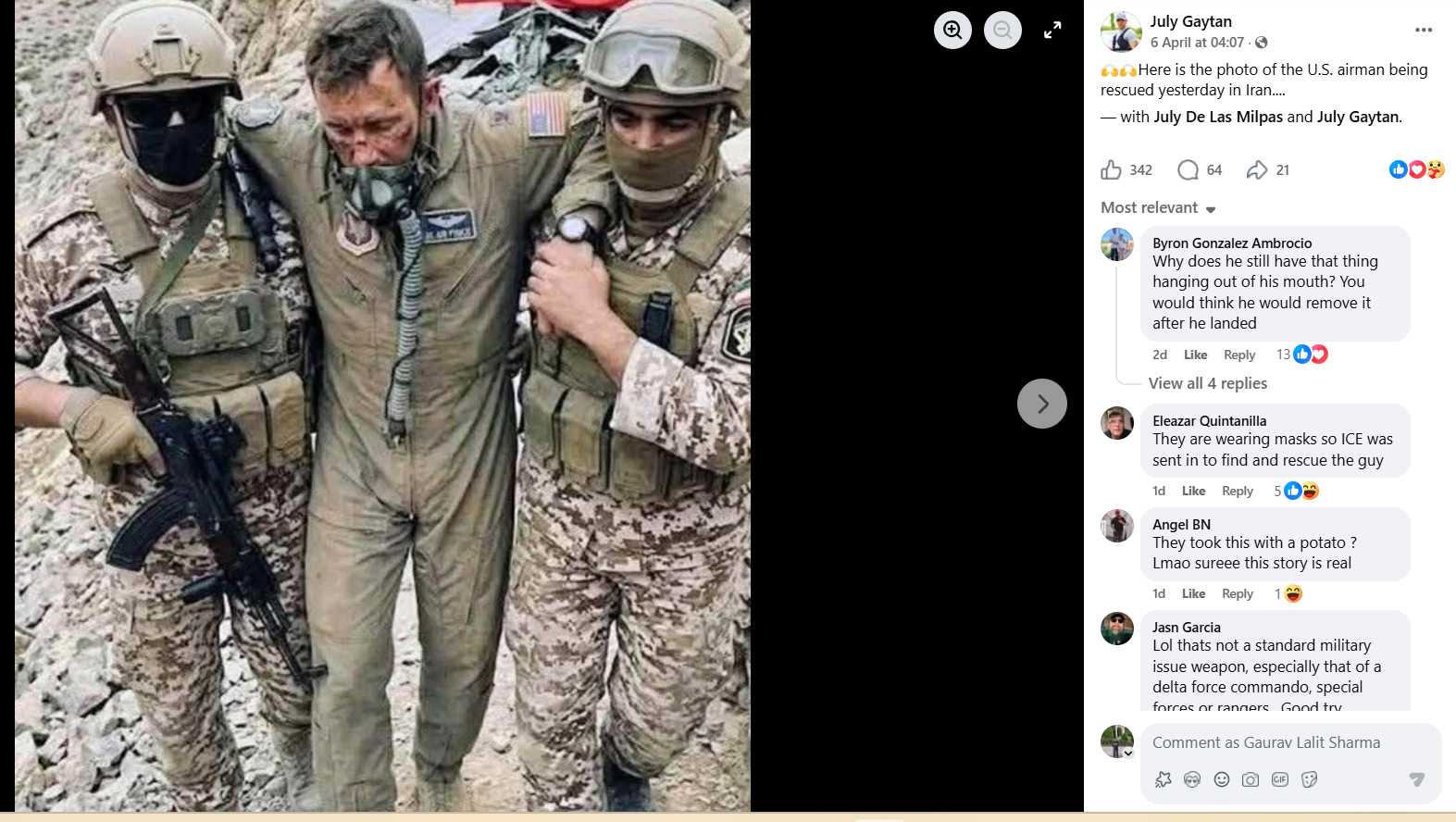
A claim is circulating on social media that the U.S. military successfully rescued a missing crew member of an F-15E fighter jet in Iran. Along with this claim, a photo is being widely shared, allegedly showing the rescued U.S. airman after the high-risk operation. However, researches reveal that the viral image is not authentic and has been generated using artificial intelligence tools.
The Claim
On April 6, 2026, a social media user named “July Gaytan” shared the viral image with the caption: “Here is the photo of the U.S. airman being rescued yesterday in Iran.”
The post quickly gained traction, with many users believing it to be genuine.
- https://www.facebook.com/photo/?fbid=1724007721903888&set=a.116284172676259
- https://perma.cc/URM4-KEJA
Fact Check
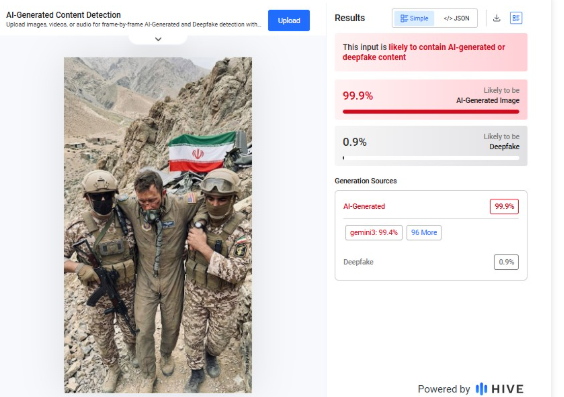
Despite extensive searches, no credible media report or official source has published any real image of the rescued crew members. This raised suspicion about the authenticity of the viral photo. Hive Moderation analysis indicated a 100% probability that the image was generated using Google’s Gemini AI.
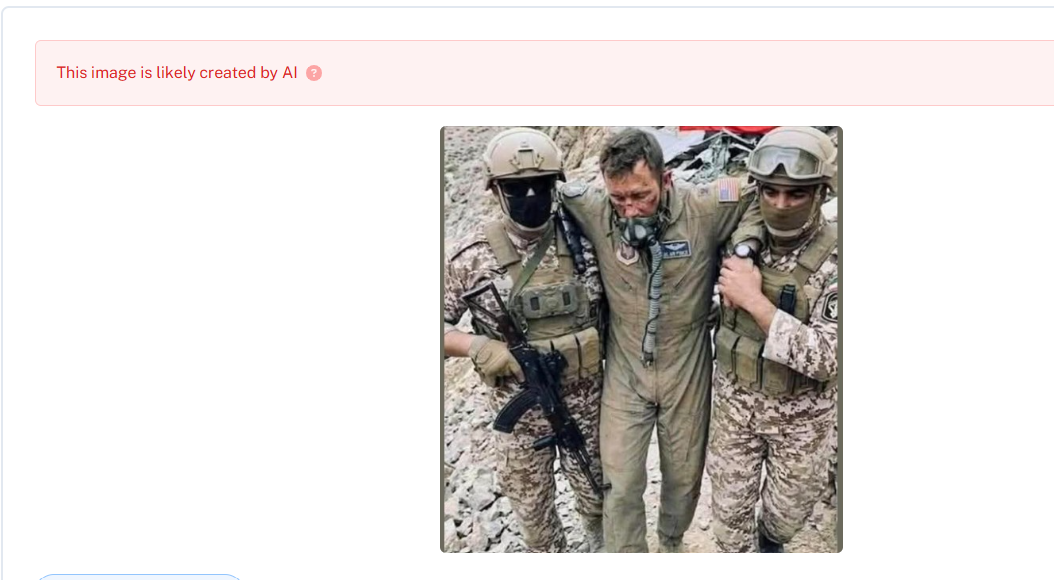
A second scan using Undetectable AI also concluded that the image is AI-generated.
Reports indicate that a U.S. Air Force F-15E Strike Eagle was shot down in Iran. The aircraft had two crew members on board: a pilot and a Weapon Systems Officer (WSO).
- The pilot was rescued shortly after the incident.
- The WSO was initially missing and remained inside Iranian territory in an injured condition.
- The U.S. later carried out a high-risk rescue operation and successfully evacuated the WSO from Iran.
U.S. President Donald Trump also confirmed the “brave and risky” rescue mission in a detailed post on his platform, Truth Social. The statement was further shared by the official White House account.
- https://x.com/WhiteHouse/status/2040644451513598220?s=20

Conclusion
The viral image claiming to show a rescued U.S. airman in Iran is not real. It has been created using AI tools, likely Google’s Gemini. While it is true that the U.S. conducted a high-risk operation to rescue the missing crew member, no authentic image of the rescue or the personnel has been publicly released.

Related Blogs

Executive Summary
A video showing stone pelting on vehicles is being widely shared on social media and falsely linked to a campaign called the “Cockroach Janata Party.” The claim suggests that people have taken to the streets and are attacking VIP vehicles by throwing stones. CyberPeace Research Wing research found that the video is from March and shows stone pelting on a police vehicle in Mathura following the killing of “Farasa Wale Baba.”
Claim
An 18-second viral clip circulating online shows a crowd throwing stones at passing vehicles. The video also contains overlaid text reading,“Cockroach sarkon par utar chuke hain, ab koi VIP nahi, ab sab barabar hain.”Users are sharing it as part of a supposed “Cockroach Janata Party” campaign.

Fact Check
A reverse image search of key frames shows that the clip was originally uploaded on multiple social media accounts on March 22–23, where it was described as an incident from Mathura following the death of a local figure known as “Farasa Wale Baba.” In those posts, the incident was reported as stone pelting on a police vehicle by miscreants.
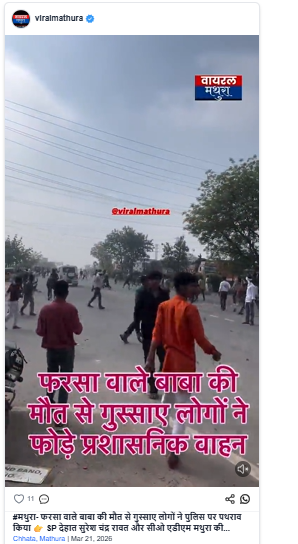
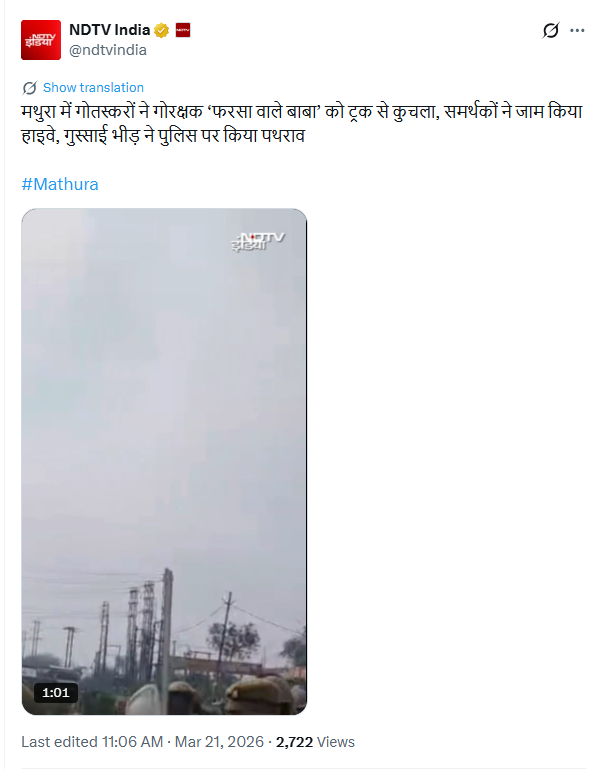
Further verification found the same visuals in a video posted by NDTV India on March 21, 2026, with a caption stating that it showed stone pelting on police during unrest in Mathura after the death of “Farasa Wale Baba.”
Conclusion
The researchclearly confirms that the viral video has been misrepresented. The footage is from a March incident in Mathura involving unrest following a local death, and it has no connection to any “Cockroach Janata Party” campaign or VIP-targeted violence claims.

Introduction
Misinformation spreads differently with respect to different host environments, making localised cultural narratives and practices major factors in how an individual deals with it when presented in a certain place and to a certain group. In the digital age, with time-sensitive data, an overload of information creates a lot of noise which makes it harder to make informed decisions. There are also cases where customary beliefs, biases, and cultural narratives are presented in ways that are untrue. These instances often include misinformation related to health and superstitions, historical distortions, and natural disasters and myths. Such narratives, when shared on social media, can lead to widespread misconceptions and even harmful behaviours. For example, it may also include misinformation that goes against scientific consensus or misinformation that contradicts simple, objectively true facts. In such ambiguous situations, there is a higher probability of people falling back on patterns in determining what information is right or wrong. Here, cultural narratives and cognitive biases come into play.
Misinformation and Cultural Narratives
Cultural narratives include deep-seated cultural beliefs, folklore, and national myths. These narratives can also be used to manipulate public opinion as political and social groups often leverage them to proceed with their agenda. Lack of digital literacy and increasing information online along with social media platforms and their focus on generating algorithms for engagement aids this process. The consequences can even prove to be fatal.
During COVID-19, false claims targeted certain groups as being virus spreaders fueled stigmatisation and eroded trust. Similarly, vaccine misinformation, rooted in cultural fears, spurred hesitancy and outbreaks. Beyond health, manipulated narratives about parts of history are spread depending on the sentiments of the people. These instances exploit emotional and cultural sensitivities, emphasizing the urgent need for media literacy and awareness to counter their harmful effects.
CyberPeace Recommendations
As cultural narratives may lead to knowingly or unknowingly spreading misinformation on social media platforms, netizens must consider preventive measures that can help them build resilience against any biased misinformation they may encounter. The social media platforms must also develop strategies to counter such types of misinformation.
- Digital and Information Literacy: Netizens must encourage developing digital and information literacy in a time of information overload on social media platforms.
- The Role Of Media: The media outlets can play an active role, by strictly providing fact-based information and not feeding into narratives to garner eyeballs. Social media platforms also need to be careful while creating algorithms focused on consistent engagement.
- Community Fact-Checking: As localised information prevails in such cases, owing to the time-sensitive nature, immediate debunking of precarious information by authorities at the ground level is encouraged.
- Scientifically Correct Information: Starting early and addressing myths and biases through factual and scientifically correct information is also encouraged.
Conclusion
Cultural narratives are an ingrained part of society, and they might affect how misinformation spreads and what we end up believing. Acknowledging this process and taking counter measures will allow us to move further and take steps for intervention regarding tackling the spread of misinformation specifically aided by cultural narratives. Efforts to raise awareness and educate the public to seek sound information, practice verification checks, and visit official channels are of the utmost importance.
References
- https://www.icf.com/insights/cybersecurity/developing-effective-responses-to-fake-new
- https://www.dw.com/en/india-fake-news-problem-fueled-by-digital-illiteracy/a-56746776
- https://www.apa.org/topics/journalism-facts/how-why-misinformation-spreads

On June 5th, the world comes together to reflect on how the way we live impacts the environment. We discuss conserving water, cutting back on plastic, and planting trees, but how often do we think about the environmental impact of our digital lives?
The internet is ubiquitous but invisible in a world that is becoming more interconnected by the day. It drives our communications, meetings, and recollections. However, there is a price for this digital convenience: carbon emissions.
A Digital Carbon Footprint: What Is It?
Electricity is necessary for every video we stream, email we send, and file we store on the cloud. But almost 60% of the electricity produced today is generated from burning fossil fuels. The digital world uses an incredible amount of energy, from the energy-hungry data centres that house our information to the networks that send it. Thus, the greenhouse gas emissions produced by our use of digital tools and services are referred to as our "digital carbon footprint."
To put it in perspective:
- Up to 150–200 grams of CO₂ can be produced by streaming an hour-long HD video on your phone.
- A typical email sent can release about 4 grams of CO₂, and more if it contains attachments.
- Comparable to the airline industry, the internet as a whole accounts for 1.5% to 4% of global greenhouse gas emissions.
Why It Matters
Ironically, despite the fact that digital life frequently feels "clean" and weightless, it is backed by enormous, power-hungry infrastructures. Additionally, our online activity is growing at a rapid pace as digital penetration increases. Plus, with the advent of AI and big data, the demand for energy is only going to rise. The harms of air, water, and soil degradation, and biodiversity loss are already upon us. It's high time we reconsider how we use technology on World Environment Day.
What Can You Do?
The good news is that even minor adjustments to our online conduct can have an impact.
🗑️ Clear out your digital clutter by getting rid of unnecessary emails, apps, and files.
📥 Unsubscribe from mailing lists that you no longer use.
📉 When HD is not required, stream videos with lower quality.
⚡ Make use of energy-saving gadgets and disconnect them when not in use.
🌐 Make the move to renewable energy-powered, environmentally friendly cloud providers.
🗳️ Support informed policy by engaging with your elected representatives and advocating for greener tech policies. Knowing your digital rights and responsibilities can help shape smarter policies and a healthier planet.
We at the CyberPeace Foundation think that cyberspace needs to be sustainable. An eco-friendly digital world is also a safer one, where all communities can thrive in harmony. We must promote digital responsibility, including its environmental component, as we work towards digital equity and resilience.
On this World Environment Day, let's go one step further and work towards a greener internet as well as a greener planet.
