
#FactCheck-Viral Claim That Modi’s Jhalmuri Vendor Was an SPG Commando Is False
Executive Summary
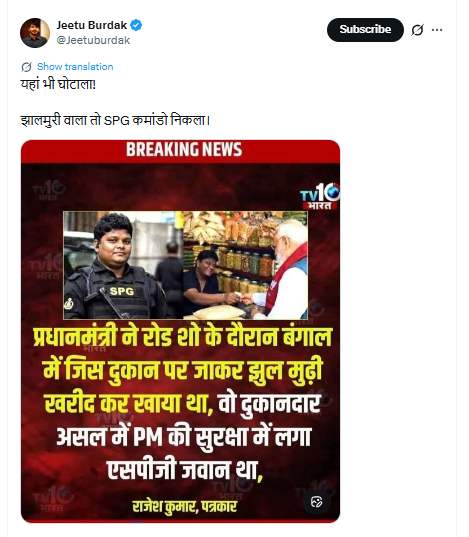
A collage of two images circulating on social media is falsely claiming that the street vendor who served jhalmuri to Prime Minister Narendra Modi during an election campaign in Jhargram was actually a personnel from the Special Protection Group (SPG). Research by the CyberPeace Research Wing found the claim to be false and misleading, indicating that it is being shared as part of election-related misinformation. The vendor and the SPG personnel seen in the viral collage are two different individuals.
Claim
An X (formerly Twitter) user, “@Jeetuburdak,” shared the viral collage on April 21, 2026, with the caption: “Another scam! The jhalmuri seller turned out to be an SPG commando.” The post quickly gained traction online.
Fact Check
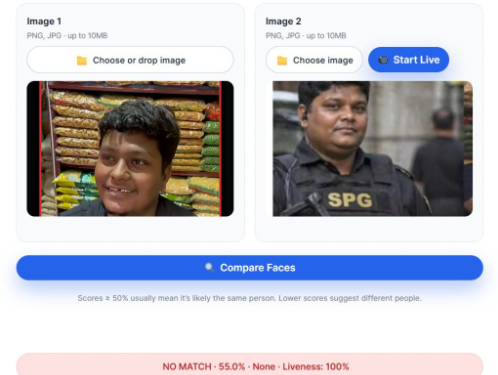
A close examination of the two images used in the collage shows clear visual differences between the individuals. The person seen in SPG uniform does not match the street vendor who served food to the prime minister. Reverse image searches were conducted using multiple tools to trace the origin of the images. While no verifiable source was found linking the SPG personnel’s image to the vendor, several credible reports and videos featured the actual jhalmuri seller from the campaign event.
- https://x.com/ANI/status/2045859146508177911?s=20
- https://news24online.com/cities/kolkata/who-is-the-man-that-served-jhalmuri-to-pm-modi-know-his-daily-income-and-what-he-talked-about-with-pm/811123/

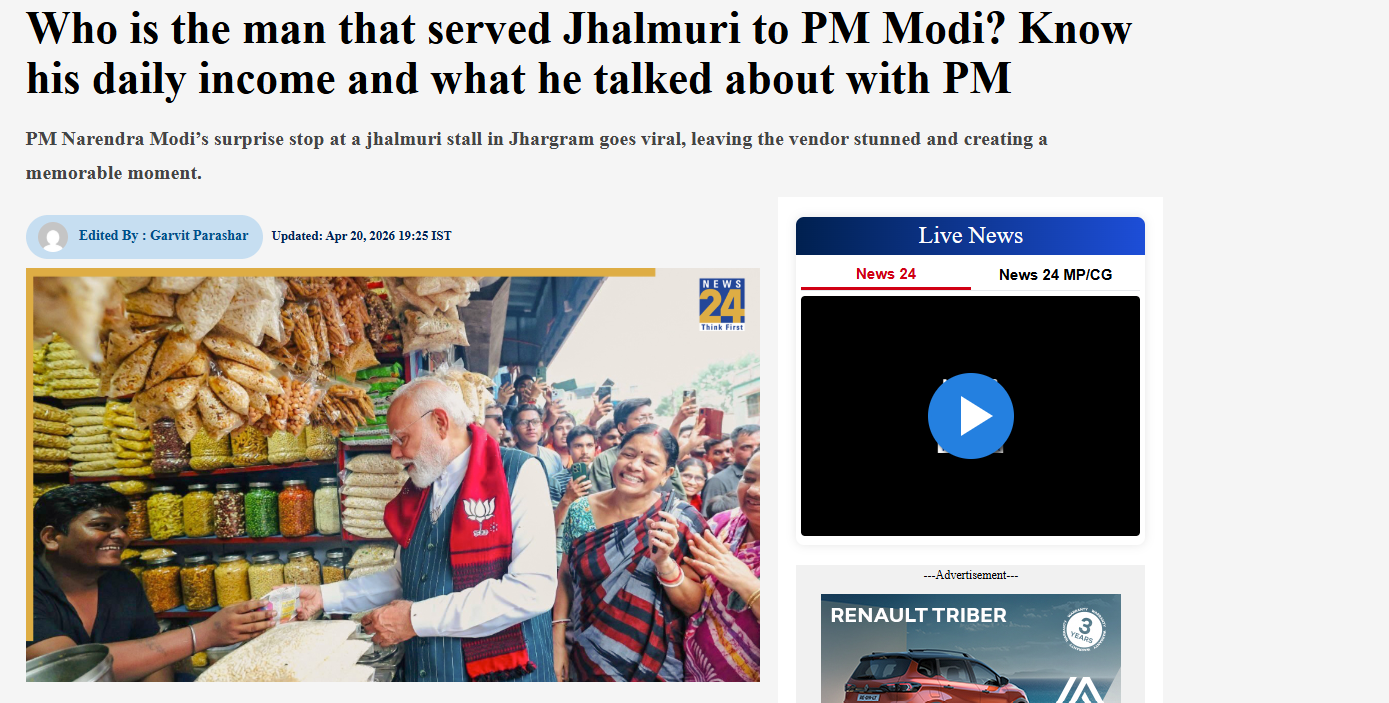
According to media reports, the prime minister briefly stopped at a roadside stall during the campaign in Jhargram and interacted with the vendor while enjoying jhalmuri. The vendor was later interviewed by multiple outlets, further confirming his identity as a local seller. Additionally, technical facial comparison analysis using online tools also indicated that the two individuals in the viral collage are not the same person.
Conclusion
The claim that the jhalmuri vendor was an SPG commando is false and misleading. The viral collage shows two different individuals, and there is no evidence to support the allegation.

Related Blogs
Procedural History:
The case started with a 2011 Madras High Court ruling that included the appellant’s personal information. In the case discussed, the court decided in 2024, the appellant went to the Madurai Bench of the Madras High Court to request that his name and other identifying information from that previous ruling be redacted. He argued that his right to privacy under Article 21 of the Indian Constitution was violated by the ongoing release of such private information into the public arena. He claimed that the revelation had hurt him in real ways, such as having his application for an Australian visa denied. Therefore, without compromising the ideals of open justice, the current procedures aimed to have the court recognize a person’s “Right to be Forgotten” within a broader framework of privacy and data protection.
Background and Factual Matrix
The appellant was charged under Sections 417 and 376 of the IPC. The trial court convicted him in 201, but later, the High Court in 2014 fully, completely and unconditionally acquitted him, which was not based on the benefit of doubt. Following the acquittal, he remarried and has three children. The judgment of both the High Court and the Trial Court has personal and intimate details about him. Being available in the public domain has caused him significant repercussions, as he was denied a visa to travel to Australia by authorities, citing the criminal cases. The appellant has filed a plea seeking a mandamus directing the Registrar General, Additional Registrar General, and Registrar (IT-Statistics) as R1, R2, R3 to redact his name and other identities from the acquittal judgment. He has sought a direction from Ikanoon Software Development Private Limited (R4) to reflect the redaction in its publication.
Issue
- Whether a writ of mandamus can lie against a High Court for redaction of personal details from its own judgment, or does such a prayer tantamount to a High Court issuing a writ against itself?
- Whether the High Court, being a Court of Record under Article 215 of the Indian Constitution, is entitled to preserve its record for perpetuity in its original form without any modification or redaction?
- Whether the ‘Right to be Forgotten' can be recognised and enforced in the absence of a specific statutory provision or Supreme Court direction, given that it constitutes an exception to the fundamental principle of open courts and open justice?
Adjudication and Reasoning
The division bench has allowed the Writ appeal and granted the following relief:
- R4 directed to take down the judgment in Crl.A. (MD) No.321 of 2011 dated 30.04.2014 forthwith.
- R1 to R3 directed to redact the name and other details of the Writ Petitioner relating to his identity from the judgment dated 30.04.2014 in Crl.A.(MD) No. 321 of 2011 and ensure that only the redacted judgment is available for publication or for uploading.
Rule
- Courts have a wide discretion in deciding whether to allow redaction or not. Such discretion can either be granted at the request of the party seeking redaction or, in appropriate cases, even suo moto by the court.
- The accused who have earned full, complete and unconditional acquittal without any benefit of doubt have a legitimate claim to move forward for redaction of personal information.
- The open Court doesn’t require absolute disclosure of all personal information, and the courts, while deciding the concern of privacy and the right to ensure that in litigations to leave behind parts of their past which are no longer relevant, have to balance the concept of open Court on the one hand and privacy concerns of a citizen on the other.
- As the High Court is the repository of a wide range of information and is entitled to preserve the original record in perpetuity. However, without diluting the sanctity of the original record, the public reflection of that record can be moderated to preserve the privacy of the person to whom that record pertains.
Reasoning
- Drawing on the judgment K.S. Puttaswamy v. Union of India, the court found Article 21 to protect not only informational privacy but also the "right to be forgotten," which gives individuals the right to request the deletion of any personal data when there is no longer any legitimate public interest in retaining such information. Such irreparable reputational damage is thus an infringement on constitutional privacy that demands judicial redaction.
- The court rejected the argument that a writ against its own order is impermissible, drawing a distinction between challenging the legal correctness of a judgment and seeking redaction of personal information. Allowing redaction will not question the validity of the judgment; rather, it will simply change its public appearance to ensure privacy.
- Since a High Court is a Court of Record with an obligation to preserve its judgments in their unaltered form forever, the court held here that such internal maintenance of complete records was not incompatible with the issuance of a redacted public version. Institutional integrity is maintained when the original kept in the archives is supplemented with a public version that masks the privacy areas.
- Open justice principles work to establish transparency, accountability, and public confidence, but these are not absolute. The court took a proportionality stance: personal identifiers, where they neither educate nor have precedential value and continue to inflict harm, may be expunged without affecting the established legal principles of judgment.
- Although the DPDP Act exempts courts from several statutory obligations, the court held that it can, by virtue of its inherent discretion, protect personal data, and in so doing, exercise that power without the need for any legislative command. Traditionally the Madras High Court rules provide for the possibility of restriction of certified copies, thus establishing redaction as feasible both legally and administratively.
Transforming Misguided Knowledge into Social Strength
यत्र योगेश्वरः कृष्णो यत्र पार्थो धनुर्धरः । तत्र श्रीर्विजयो भूतिर्ध्रुवा नीतिर्मतिर्मम ॥ (Bhagavad Gita) translates as “Where there is divine guidance and righteous effort, there will always be prosperity, victory, and morality.” In the context of the idea of rehabilitation, this verse teaches us that if offenders receive proper guidance, their skills can be redirected. Instead of causing harm, the same abilities can be transformed into tools for protection and social good. Cyber offenders who misuse their skills can, through structured guidance, be redirected toward constructive purposes like cyber defence, digital literacy, and security innovation. This interpretation emphasises not discarding the “spoiled” but reforming and reintegrating them into society.
Introduction
Words and places are often associated with positive and negative aspects based on their history, stories, and the activities that might happen in that certain place. For example, the word “hacker” has a negative connotation, as does the place “Jamtara”, which is identified with its shady history as a cybercrime hotspot, but often people forget that there are lots of individuals who use their hacking skills to serve and protect their nation, also known as “white hat hackers”, a.k.a. ethical hackers, and places like Jamtara have a substantial number of talented individuals who have lost their way and are often victims of their circumstances. This presents the authorities with a fundamental issue of destigmatising cybercriminals and the need to act on their rehabilitation. The idea is to shift from punitive responses to rehabilitative and preventive approaches, especially in regions like Jamtara.
The Deeper Problem: Systemic Gaps and Social Context
Jamtara is not an isolated or a single case; there are many regions like Mewat, Bharatpur, Deoghar, Mathura, etc., that are facing a crisis, and various lives are uprooted because youth are entrapped in cybercrime rings, often to escape unemployment, poverty, and simply in the hope of a better life. In one such heart-wrenching story, a 24-year-old Shakil, belonging to Nuh, Haryana, was arrested for committing various cybercrimes, including sextortion and financial scams, and while his culpability is not in question here, his background reflects a deeper issue. He committed these crimes to pay for his diabetic father’s mounting bills and to see his sister, Shabana, married. This is the story of almost every other individual in the rural areas who is forced into committing these crimes, if not by a person, but by their circumstances. In a news report covered in 2024, an intervention was launched by various Meo leaders and social organisations in the Mewat region aimed at weaning the youth away from cybercrimes.
Not only poverty, but lack of education, social awareness, and digital literacy have acted as active agents for pushing the youth of India away from mainstream growth and towards the dark trenches of the cybercrime world. The local authorities have made active efforts to solve this problem; for instance, to dispel Jamtara’s unfavourable reputation for cybercrime and set the city firmly on the path to change, community libraries have been established in all 118 panchayats spread across six blocks of the district by IAS officer and DM Faiz Aq Ahmed Mumtaz.
The menace of cybercrimes is not limited to rural areas, as various reports surfaced during and post-COVID, where young children from urban areas became victims of various cybercrimes such as cyberbullying and stalking, and often perpetrators were someone from the same age group, adding to the dilemma. The issue has been noticed by various agencies, and the a need to deal with both victims and the accused in a sensitised manner. Recently, ex-CJI DY Chandrachud called for international collaboration to combat juvenile cybercrimes, as there are many who are ensnared and coerced into these criminal gangs, and swift resolution is the key to ensuring justice and rehabilitation.
CyberPeace Policy Outlook
Cybercrime is often a product of skill without purpose. The youth who are often pushed into these crimes either have an incomplete idea of the veracity of their actions or have no other resort. The legal system and the agencies will have to look beyond the nature of the crimes and adopt and undertake a reformative approach so that these people can make their way into society and harness their skills ethically. A good alternative would be to organise Cyber Bootcamps for Reform, i.e., structured training with placement support, and explain to them how ethical hacking and cybersecurity careers can be attractive alternatives. One way to make the process effective is to share real-world stories of reformed hackers. There are many who belong to small villages and districts who have written success stories on reform after participating in digital training programmes. The crime they commit doesn’t have to be the last thing they are able to do in life; it doesn’t have to be the ending. The digital programmes should be organised in a way and in a vernacular that the youth are well-versed in, so there are no language barriers. The programme may give training for coding, cyber hygiene, legal literacy, ethical hacking, psychological counselling, and financial literacy workshops.
It has become a matter of reclaiming the misdirected talent, as rehabilitation is not just humane; it is strategic in the fight against cybercrime. On 1st April 2025, IIT Madras Pravartak Technologies Foundation finished training its first batch of law enforcement officers in cybersecurity techniques. The initiative is commendable, and a similar initiative may prove effective for the youth accused of cybercrimes, and preferably, they can be involved in similar rehabilitation and empowerment programmes during the early stages of criminal proceedings. This will help prevent recidivism and convert digital deviance into digital responsibility. In order to successfully incorporate this into law enforcement, the police can effectively use it to identify first-time, non-habitual offenders involved in low-impact cybercrimes. Also, courts can exercise the authority to require participation in an approved cyber-reform programme as a condition of bail in addition to bail hearings.
Along with this, under the Juvenile Justice (Care and Protection of Children) Act, 2015, children in conflict with the law can be sent to observation homes where modules for digital literacy and skill development can be implemented. Other methods that may prove effective may include Restorative Justice Programmes, Court-monitored rehabilitation, etc.
Conlusion
A rehabilitative approach does not simply punish offenders, it transforms their knowledge into a force for good, ensuring that cybercrime is not just curtailed but converted into cyber defence and progress.
References
- Ismat Ara, How an impoverished district in Haryana became a breeding ground for cybercriminals, FRONTLINE (Jul 27, 2023, 11:00 IST), https://frontline.thehindu.com/the-nation/spotlight-how-nuh-district-in-haryana-became-a-breeding-ground-for-cybercriminals/article67098193.ece )
- Mohammed Iqbal, Counselling, skilling aim to wean Mewat youth away from cybercrimes, THE HINDU (Jul. 28, 2024, 01:39 AM), https://www.thehindu.com/news/cities/Delhi/counselling-skilling-aim-to-wean-mewat-youth-away-from-cybercrimes/article68454985.ece
- Prawin Kumar Tiwary,Jamtara’s journey from cybercrime to community libraries, 101 REPORTERS (Feb. 16, 2022), https://101reporters.com/article/development/Jamtaras_journey_from_cybercrime_to_community_libraries .
- IIT Madras Pravartak completes Training First Batch of Cyber Commandos, PRESS INFORMATION BUREAU (Apr. 1, 2025, 03:36 PM), https://www.pib.gov.in/PressReleasePage.aspx?PRID=2117256
Executive Summary
A video showing a scuffle between a group of women and police personnel is being widely shared on social media with the claim that it shows Delhi Police assaulting women protesters at Jantar Mantar. CyberPeace Research Wing ’s research found the claim to be misleading. The viral video is not from Jantar Mantar in Delhi but from an unrelated incident in Dehradun, Uttarakhand. The old footage is being falsely circulated as a recent video from the ongoing protests.
Claim:
A Facebook user shared the viral video claiming that Delhi Police personnel were assaulting women and girls during the protest at Jantar Mantar.
The post link, archive link and screenshot are provided below.
https://www.facebook.com/reel/2864826433884333

Fact Check:
To verify the claim, we extracted keyframes from the viral video and conducted a reverse image search using Google Lens. This led us to the same video uploaded on the Instagram account iamvikasbaliyan on October 15, 2025.
https://www.instagram.com/reels/DP0H_SSE625/
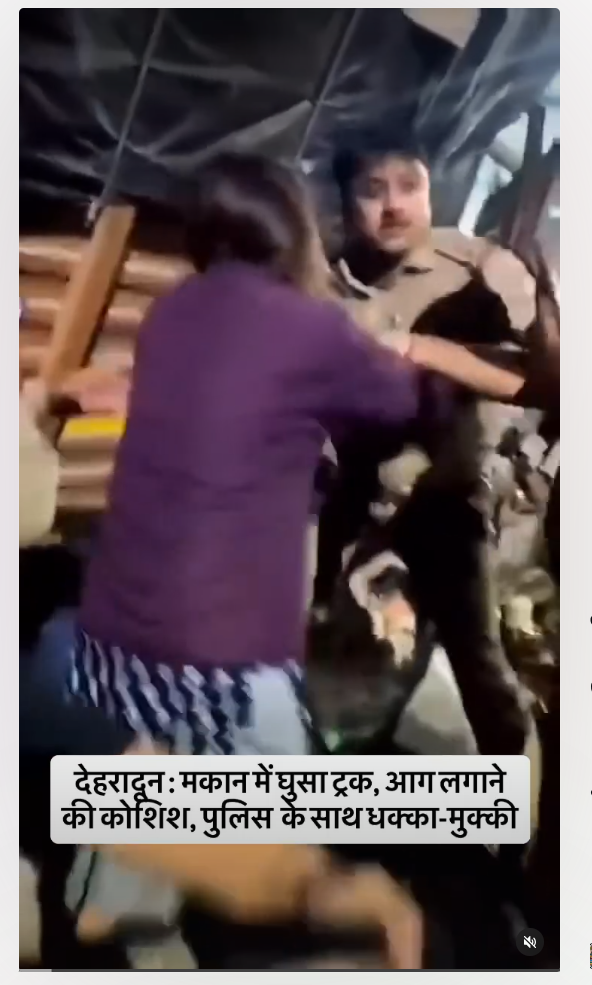
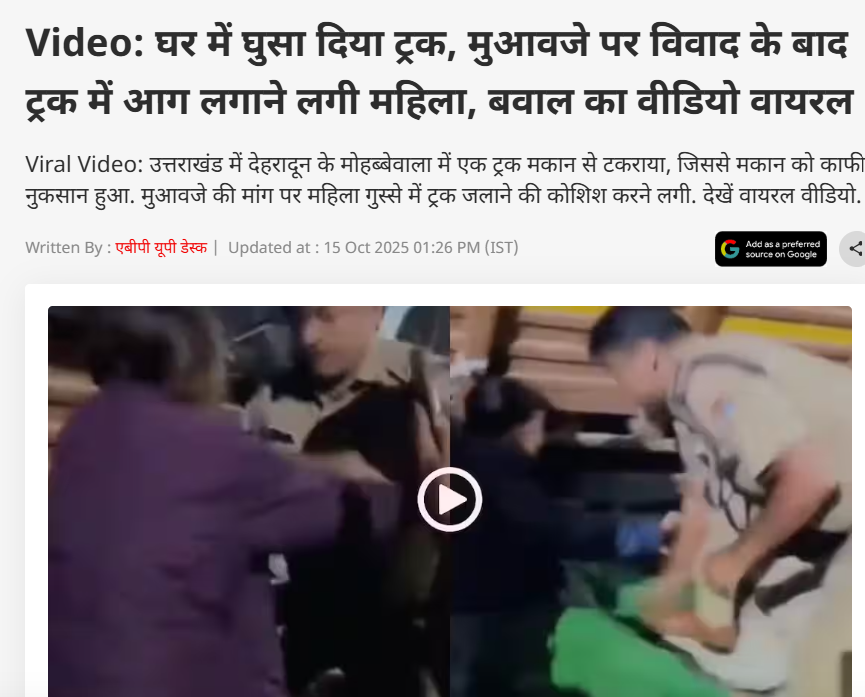
According to the information shared with the post, the incident took place in Mohabbewala, Dehradun, Uttarakhand, after a truck crashed into a house, damaging the property. The homeowner allegedly demanded compensation and, when the issue remained unresolved, attempted to set the truck on fire. When police personnel intervened to stop her, a scuffle broke out between the woman and the police. The viral video captures this incident. In the next stage of the research, we found an ABP News report published on October 15, 2025, carrying the same visuals as the viral video. The report also identified the incident as having occurred in Mohabbewala, Dehradun.
Conclusion:
CyberPeace Research Wing ’s research found the viral claim to be misleading. The video does not show Delhi Police assaulting women protesters at Jantar Mantar. It is an old video from Dehradun, Uttarakhand, showing an unrelated incident that has been falsely linked to the ongoing protests in Delhi.
