
#FactCheck - Old Japanese Earthquake Footage Falsely Linked to Tibet
Executive Summary:
A viral post on X (formerly Twitter) gained much attention, creating a false narrative of recent damage caused by the earthquake in Tibet. Our findings confirmed that the clip was not filmed in Tibet, instead it came from an earthquake that occurred in Japan in the past. The origin of the claim is traced in this report. More to this, analysis and verified findings regarding the evidence have been put in place for further clarification of the misinformation around the video.

Claim:
The viral video shows collapsed infrastructure and significant destruction, with the caption or claims suggesting it is evidence of a recent earthquake in Tibet. Similar claims can be found here and here

Fact Check:
The widely circulated clip, initially claimed to depict the aftermath of the most recent earthquake in Tibet, has been rigorously analyzed and proven to be misattributed. A reverse image search based on the Keyframes of the claimed video revealed that the footage originated from a devastating earthquake in Japan in the past. According to an article published by a Japanese news website, the incident occurred in February 2024. The video was authenticated by news agencies, as it accurately depicted the scenes of destruction reported during that event.

Moreover, the same video was already uploaded on a YouTube channel, which proves that the video was not recent. The architecture, the signboards written in Japanese script, and the vehicles appearing in the video also prove that the footage belongs to Japan, not Tibet. The video shows news from Japan that occurred in the past, proving the video was shared with different context to spread false information.

The video was uploaded on February 2nd, 2024.
Snap from viral video

Snap from Youtube video

Conclusion:
The video viral about the earthquake recently experienced by Tibet is, therefore, wrong as it appears to be old footage from Japan, a previous earthquake experienced by this nation. Thus, the need for information verification, such that doing this helps the spreading of true information to avoid giving false data.
- Claim: A viral video claims to show recent earthquake destruction in Tibet.
- Claimed On: X (Formerly Known As Twitter)
- Fact Check: False and Misleading

Related Blogs
.webp)
Smart Wearable devices are designed to track several activities in defined parameters and are increasingly becoming a part of everyday life. According to Markets and Markets Report, the global wearable tech market is projected to reach a staggering USD 256.4 billion by 2026. One of the main areas of use of wearable devices is health, including biomedical research, health care, personal health practices and tracking, technology development, and engineering. These wearable devices often include digital health technologies such as consumer smartwatches that monitor an individual's heart rate and step count, and other body-worn sensors like those that continuously monitor blood glucose concentration.
Wearable devices used by the general population are getting increasingly popular. Health devices like fitness trackers and smartwatches enable continuous monitoring of personal health. Privacy is an emerging concern due to the real-time collection of sensitive data. Vulnerabilities due to unauthorised access or discrimination in case of information being revealed without consent are the primary concerns with these devices. While these concerns are present a lot of related misinformation is emerging due to the same.
While wearable devices typically come with terms of use that outline how data is collected and used, and there are regulations in place such as EU Law GDPR, such regulations largely govern the regulatory compliances on the handling of personal data, however, the implementation and compliances by the manufacturer is a one another aspect which might present the question on privacy protection. In addition, beyond the challenge of regulatory compliance, the rise of myths and misinformation surrounding wearable tech presents a separate issue.
Common Misconceptions About Privacy with Wearable Tech
- With the rapid development and growth of wearable technology their use has been subject to countless rumours which fuel misinformation narratives in the minds of general public. Addressing these misconceptions and privacy concerns requires targeted strategies.
- A prevalent misconception is that they are constantly spying on users. While wearable devices collect users’ data in real time, their vulnerability to unauthorised access is similar to that of a non-wearable device. The issue is of consent when it comes to wearable technology because it gives the ability to record. If permissions are not asked when a person is being recorded then the data is accessible to external entities.
- There is a common myth that wearable tech is surveillance tool. This is entirely a conjecture. These devices collect the user data with their prior consent and have been created to provide them with real-time information, most commonly physical health information. Since users choose the information shared, the idea of wearable tech serving as a surveillance tool is unfounded.
- Another misconception about wearable tech is that it can diagnose medical conditions. These devices collect real-time health data, such as heart rate or activity levels, they are not designed for medical diagnosis. The data collected may not always be accurate or reliable for clinical use to be interpreted by a healthcare professional. This is mainly because the makers of these devices are not held to the safety and liability standards that medical providers are.
- A prevalent misconception is that wearable tech can cure health issues, which is simply untrue. Wearable tech devices are essentially tracking the health parameters that a user sets. It in no way is a cure for any health issue that one suffers from. A user can manage their health based on the parameters they set on the device such as the number of steps that they walk, check on the heart rate and other metrics for their mental satisfaction but they are not a cure to treat diseases. Wearable tech acts as alerts, notifying users of important health metrics and encouraging proactive health management.
Addressing Privacy and Health Concerns in Wearable Tech
Wearable technology raises concerns for privacy and health due to the colossal amount of personal data collected. To address these, strong data protection measures are essential, ensuring that sensitive health information is securely stored and shared only with consent. Providing users with control over their data is one of the ways to build user trust. It includes enabling them to opt in, access, or delete the data in question. Regulators should establish clear guidelines, ensuring wearables ensure the compliances with data protection regulations like HIPPA, GDPR or DPDP Act, whichever is applicable as per the jurisdiction. Furthermore, global standards for data encryption, device security, and user privacy should be implemented to mitigate risks. Transparency in data usage and consistent updates to software security are also crucial for protecting users' privacy and health while promoting the responsible use of wearable tech.
CyberPeace Insights
- Making informed decisions about wearable tech starts with thorough research. Start by reading reviews and comparing products to assess their features, compatibility, and security standards.
- Investigate the manufacturer’s reputation for data protection and device longevity. Understanding device capabilities is crucial. One should evaluate whether the wearable meets their needs, such as fitness tracking, health monitoring, or communication features. Consider software security and updates, and data accuracy when comparing options. Opt for devices that offer two-factor authentication for an additional layer of security.
- Check the permissions requested by the accompanying app; only grant access to data that is necessary for the device's functionality. Always read the terms of use to understand your rights and responsibilities regarding the use of the device. Review and customize data-sharing settings for better control to prevent unauthorised access.
- Staying updated on the tech is equally important. A user should follow the advancements in wearable technology be it regular security updates, or regulatory changes that may affect privacy and usability. This ensures getting tech that aligns with user lifestyle while meeting privacy and security expectations.
Conclusion
Privacy and Misinformation are key concerns that emerge due to the use of wearable tech designed to offer benefits such as health monitoring, fitness tracking, and personal convenience. It requires a combination of informed decision-making by users and stringent regulatory oversight to overcome the issues that emerge due to misinformation about these devices. Users must ensure they understand the capabilities and limitations of their devices, from data accuracy to privacy risks. Additionally, manufacturers and regulators need to prioritise transparency, data protection, and compliance with global standards like GDPR or DPDP to build trust. As wearable tech continues to evolve, a balanced approach to innovation and privacy will be essential in fostering its responsible and beneficial use for all.
References
- https://thehealthcaretechnologyreport.com/privacy-data-security-concerns-rise-as-healthcare-wearables-gain-popularity/
- https://journals.plos.org/digitalhealth/article?id=10.1371/journal.pdig.0000104
- https://www.marketsandmarkets.com/Market-Reports/wearable-electronics-market-983.html?gclid=Cj0KCQjwgMqSBhDCARIsAIIVN1V0sqrk6SpYSga3rcDtWcwh8npZ08L0_s4X91gh7yPAa6QmsctB-lMaAlpqEALw_wcB
- https://www.cambridge.org/core/journals/legal-information-management/article/health-data-on-the-go-navigating-privacy-concerns-with-wearable-technologies/05DAF11EFA807051362BB39260C4814C

Executive Summary:
A viral online image claims to show Arvind Kejriwal, Chief Minister of Delhi, welcoming Elon Musk during his visit to India to discuss Delhi’s administrative policies. However, the CyberPeace Research Team has confirmed that the image is a deep fake, created using AI technology. The assertion that Elon Musk visited India to discuss Delhi’s administrative policies is false and misleading.


Claim
A viral image claims that Arvind Kejriwal welcomed Elon Musk during his visit to India to discuss Delhi’s administrative policies.


Fact Check:
Upon receiving the viral posts, we conducted a reverse image search using InVid Reverse Image searching tool. The search traced the image back to different unrelated sources featuring both Arvind Kejriwal and Elon Musk, but none of the sources depicted them together or involved any such event. The viral image displayed visible inconsistencies, such as lighting disparities and unnatural blending, which prompted further investigation.
Using advanced AI detection tools like TrueMedia.org and Hive AI Detection tool, we analyzed the image. The analysis confirmed with 97.5% confidence that the image was a deepfake. The tools identified “substantial evidence of manipulation,” particularly in the merging of facial features and the alignment of clothes and background, which were artificially generated.


Moreover, a review of official statements and credible reports revealed no record of Elon Musk visiting India to discuss Delhi’s administrative policies. Neither Arvind Kejriwal’s office nor Tesla or SpaceX made any announcement regarding such an event, further debunking the viral claim.
Conclusion:
The viral image claiming that Arvind Kejriwal welcomed Elon Musk during his visit to India to discuss Delhi’s administrative policies is a deep fake. Tools like Reverse Image search and AI detection confirm the image’s manipulation through AI technology. Additionally, there is no supporting evidence from any credible sources. The CyberPeace Research Team confirms the claim is false and misleading.
- Claim: Arvind Kejriwal welcomed Elon Musk to India to discuss Delhi’s administrative policies, viral on social media.
- Claimed on: Facebook and X(Formerly Twitter)
- Fact Check: False & Misleading

Executive Summary
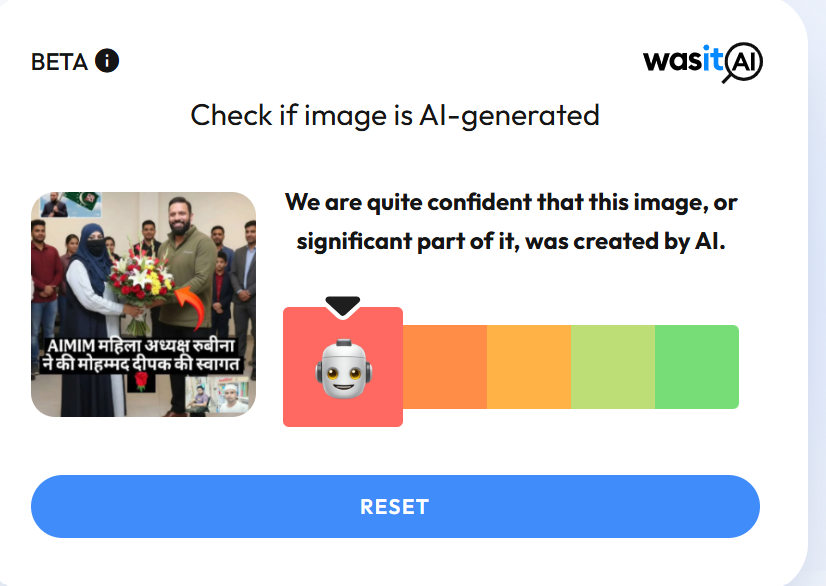
A dispute had recently emerged in Kotdwar, Uttarakhand, over the name of a shop. During the controversy, a local youth, Deepak Kumar, came forward in support of the shopkeeper. The incident subsequently became a subject of discussion on social media, with users expressing varied reactions. Meanwhile, a photo began circulating on social media showing a burqa-clad woman presenting a bouquet to Deepak Kumar. The image is being shared with the claim that All India Majlis-e-Ittehadul Muslimeen (AIMIM)’s women’s president, Rubina, welcomed “Mohammad Deepak Kumar” by presenting him with a bouquet. However, research conducted by the CyberPeace found the viral claim to be false. The research revealed that users are sharing an AI-generated image with a misleading claim.
Claim:
On social media platform Instagram, a user shared the viral image claiming that AIMIM’s women’s president Rubina welcomed “Mohammad Deepak Kumar” by presenting him with a bouquet. The link to the post, its archived version, and a screenshot are provided below.

Fact Check:
Upon closely examining the viral image, certain inconsistencies raised suspicion that it could be AI-generated. To verify its authenticity, the image was analysed using the AI detection tool Hive Moderation, which indicated a 96 percent probability that the image was AI-generated.

In the next stage of the research , the image was also analysed using another AI detection tool, Wasit AI, which likewise identified the image as AI-generated.
Conclusion
The research establishes that users are circulating an AI-generated image with a misleading claim linking it to the Kotdwar controversy.

