
#FactCheck – Human Helicopter or AI Illusion? The Truth Behind the Viral Flying Man Video
Executive Summary:
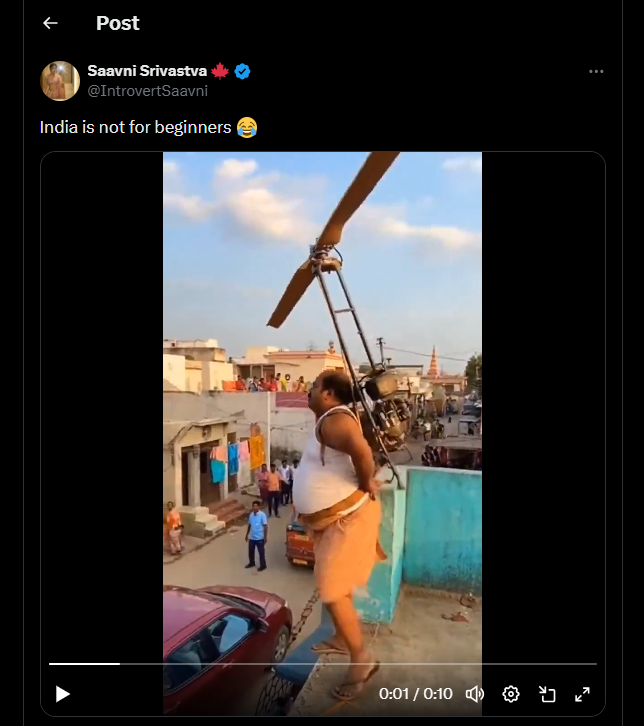
A viral video circulating on social media shows a man attempting to fly using a helicopter like fan attached to his body, followed by a crash onto a parked car. The clip was widely shared with humorous captions, suggesting it depicts a real life incident. Given the unusual nature of the visuals, the video was subjected to technical verification using AI content detection tools. Analysis using the AI detection platform indicates that the video is AI generated, and not a genuine real world event.
Claim:
A viral video (archive link) claims to show a person attempting to fly using a self made helicopter fan mechanism, briefly lifting off before crashing onto a car in a public setting. The video shows a man attempting to fly by strapping a helicopter like rotating fan to himself, essentially trying to imitate a human helicopter using a DIY mechanism. For a brief moment, it appears as if the device might work, but the attempt quickly fails due to lack of control, engineering support, and safety measures. Within seconds, the man loses balance and crashes down, landing on top of a parked car. The scene highlights a mix of overconfidence, unregulated experimentation, and risk taking carried out in a public space, with bystanders watching rather than intervening. The clip is shared humorously with the caption “India is not for beginners”.
Fact Check:
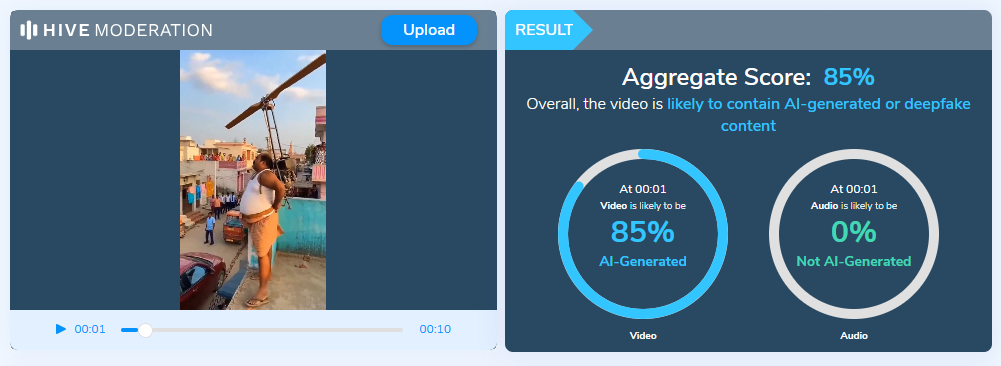
To verify the authenticity of the video, it was analyzed using the Hive Moderation AI detection tool, a widely used platform for identifying synthetic and AI generated media. The tool flagged the video with a high probability of AI generation, indicating that the visuals are not captured from a real physical event. Additional indicators such as unrealistic motion physics, inconsistent human object interaction further support the conclusion that the clip was artificially generated or heavily manipulated using generative AI techniques. No credible news reports or independent eyewitness sources corroborate the occurrence of such an incident.
Conclusion:
The claim that the video shows an individual attempting and failing to fly using a helicopter like device is false. Technical analysis confirms that the video is AI generated, and it should be treated as synthetic or fictional content rather than a real life incident. This case highlights how AI generated videos, when shared without context, can mislead audiences and be mistaken for real events, reinforcing the need for verification tools and critical evaluation of viral content.
- Claim: A viral video claims to show a person attempting to fly using a self made helicopter fan mechanism, briefly lifting off before crashing onto a car in a public setting
- Claimed On: X (Formally Twitter)
- Fact Check: False and Misleading

Related Blogs

Executive Summary:
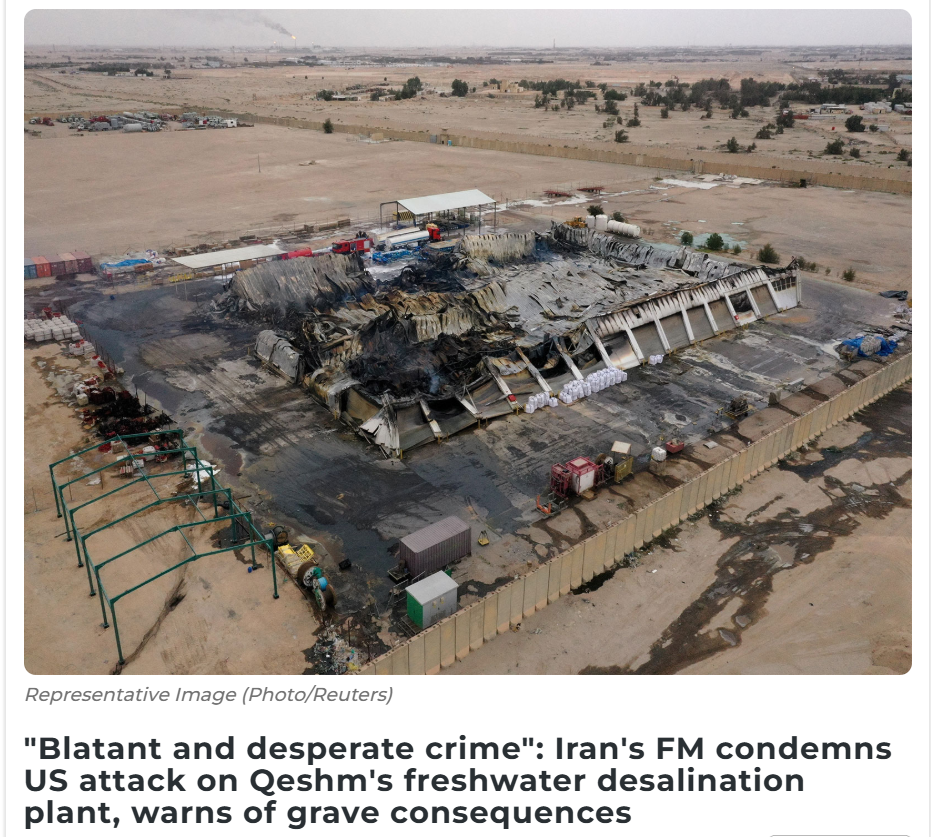
Amid the ongoing tensions and conflict involving the United States, Israel, and Iran, an image of a heavily damaged industrial facility is circulating widely on social media. Several users are sharing the picture claiming that it shows an Iranian water treatment or desalination plant destroyed in a US–Israel attack. Some media reports have also used the same image while reporting on the alleged attack on a freshwater desalination plant in Iran.
However, a research by the CyberPeace found that the claim is misleading. The viral image is not from Iran. It actually shows the aftermath of a drone attack on a warehouse belonging to a US company in Basra, Iraq.
Claim
X user “Shashank Shekhar Jha” shared the image on March 8, 2026, claiming that a freshwater desalination plant in Qeshm, Iran, had been destroyed.
Fact check
To verify the claim, we conducted a reverse image search using Google Lens. During the search, we found a report published on March 7, 2026, on the website of Asian News International (ANI). The report stated that Iran’s Foreign Minister Seyed Abbas Araghchi condemned a US attack on a freshwater desalination plant on Qeshm Island, calling it a “blatant and desperate crime.”
The report used the same viral image; however, the caption clearly mentioned that it was a representational image credited to Reuters.
https://www.aninews.in/news/world/middle-east/blatant-and-desperate-crime-irans-fm-condemns-us-attack-on-qeshms-freshwater-desalination-plant-warns-of-grave-consequences20260307212645/
To further confirm the claim, we checked the official X account of Seyed Abbas Araghchi. In a post on March 7, he condemned the alleged attack on the desalination plant in Qeshm and stated that the strike had disrupted water supply to around 30 villages. However, the post did not include any image of the incident.

Conclusion
The viral image being shared as evidence of a US–Israel attack on Iran’s water treatment plant is misleading. The photo actually shows the aftermath of a drone strike on a warehouse belonging to a US company in Basra, Iraq, and has been wrongly linked to the situation in Iran.

Introduction
The most significant change seen in the Indian cyber laws this year was the passing of the Digital Personal Data Protection Act, 2023, in the parliament. DPDP Act is the first concrete form of legislation focusing on the protection of Digital Personal Data of Indian netizens in all aspects; the act is analogous to what GDPR is for Europe. The act lays down heavy compliance mandates for the intermediaries and data fiduciaries, this has made it difficult for the tech companies a lot of policy, legal and technical changes have to be made in order to implement the act to its complete efficiency. Recently, the big techs have addressed a letter to the Minister and Minister of State of Meity to extend the implementation timeline of the act. In other news, the union cabinet has given the green light for the much-awaited MoC with Japan focused on establishing a long-term Semiconductor Supply Chain Partnership.
Letter to Meity
The lobby of the big techs represented by a Trade Body named the Big Tech Asia Internet Coalition (AIC) this week wrote to the Ministry of Electronics and Information Technology (Meity), addressing it to the Minister Ashwini Vaishnav and Minister of State (MoS) Rajeev Chandershekhra recommending a 12-18 month extension on the implementation of the Digital Personal Data Protection Act. This request comes at a time when the government has been voicing its urgency to implement the act in order to safeguard Indian data at the earliest. The trade body represented big names, including Meta, Google, Microsoft, Apple and many more. These big techs essentially comprise the segment recognised under the DPDP as the Significant Data Fiduciaries due to the sheer volume of data processed, hosted, stored, etc. In the protective sense, the act has been designed to focus on preventing the exploitation of personal data of Indian netizens by the big techs, hence, they form an integral part of the Indian Data Ecosystem. The following reasons/complications concerning the implementation of the act were highlighted in the letter:
- Unrealistic Timelines: The AIC expressed that the current timeline for the implementation of the act seems unrealistic for the big techs to establish technological, policy and legal mechanisms to be in compliance with section 5 of the act, which talks about the Obligations of a Data Fiduciary and the particular notice to be shared with the data principles in accordance with the act.
- Technical Requirements: Members of AIC expressed that the duration for the implementation of the act is much less in comparison to the time required by the tech companies to set up/deploy relevant technical critical infrastructure, SoPs and capacity building for the same. This will cause a major hindrance in establishing the efficiency of the act.
- Data Rights: Right to Erasure, Correction, Deletion, Nominate, etc., are guaranteed under the DPDP, but the big techs are not sure about the efficient implementation of these rights and hence will need fundamental changes in the technology architecture of their platform, thus expressing concern of the early implementation of the act.
- Equivalency to GDPR: The DPDP is taken to be congruent to the European GDPR, but the DPDP focuses on a few more aspects, such as cross-border data flow and compliance mandates for the right to erasure, hence a lot of GDPR-compliant big techs also need to establish more robust mechanisms to maintain compliance to Indian DPDP.
Indo-Japan MoC
A Memorandum of Cooperation (MoC) on the Japan-India Semiconductor Supply Chain Partnership was signed in July 2023 between the Ministry of Electronics and Information Technology (MeitY) of India and the Ministry of Economy, Trade and Industry (METI) of Japan. This information was shared with the Union Cabinet, which is led by Prime Minister Narendra Modi. The Ministry of Commerce (MoC) aims to expand collaboration between Japan and India in order to improve the semiconductor supply chain. This is because semiconductors are critical to the development of industries and digital technologies. The Parties agree that the MoC will take effect on the date of signature and be in effect for five years. Bilateral cooperation on business-to-business and G2G levels on ways to develop a robust semiconductor supply chain and make use of complementary skills. The cooperation is aimed at harnessing indigenous talent and creating opportunities for higher employment avenues.
MeitY's purpose also includes promoting international cooperation within bilateral and regional frameworks in the frontier and emerging fields of information technology. MeitY has engaged in Memorandums of Understanding (MoUs), Memorandums of Covenants (MoCs), and Agreements with counterpart organisations/agencies of other nations with the aim of fostering bilateral collaboration and information sharing. Additionally, MeitY aims to establish supply chain resilience, which would enable India to become a reliable partner. An additional step towards mutually advantageous semiconductor-related commercial prospects and collaborations between India & Japan is the strengthening of mutual collaboration between Japanese and Indian enterprises through this Memorandum of Understanding. The “India-Japan Digital Partnership” (IJDP), which was introduced during PM Modi's October 2018 visit to Japan, was created in light of the two countries' complementary and synergistic efforts. Its goal is to advance both current areas of cooperation and new initiatives within the scope of S&T/ICT cooperation, with a particular emphasis on “Digital ICT Technologies."
Conclusion
As we move ahead into the digital age, it is pertinent to be aware and educated about the latest technological advancements, new forms of cybercrimes and threats and legal aspects of digital rights and responsibilities, whether it is the recommendation to extend the implementation of DPDP or the Indo-Japan MoC, both of these instances impact the Indian netizen and his/her interests. Hence, the indigenous netizen needs to develop a keen interest in the protection of the Indian cyber-ecosystem to create a safer future. In our war against technology, our best weapon is technology and awareness, thus implementing the same in our daily digital lifestyles and routines is a must.
References
- https://www.eetindia.co.in/cabinet-approves-moc-on-japan-india-semiconductor-supply-chain-partnership/
- https://www.moneycontrol.com/news/business/startup/trade-body-representing-big-tech-urges-govt-to-extend-dpdp-act-implementation-by-1-5-years-11605431.html
- https://www.google.com/url?rct=j&sa=t&url=https://www.eetindia.co.in/cabinet-approves-moc-on-japan-india-semiconductor-supply-chain-partnership/&ct=ga&cd=CAEYACoTOTI3Mzg4NzEyODgwMjI2ODk0MDIaOTBiYzUxNmI5YTRjYTE1NTpjb206ZW46VVM&usg=AOvVaw2lEO7-cIBZ_ox1xV39LGLs
Executive Summary
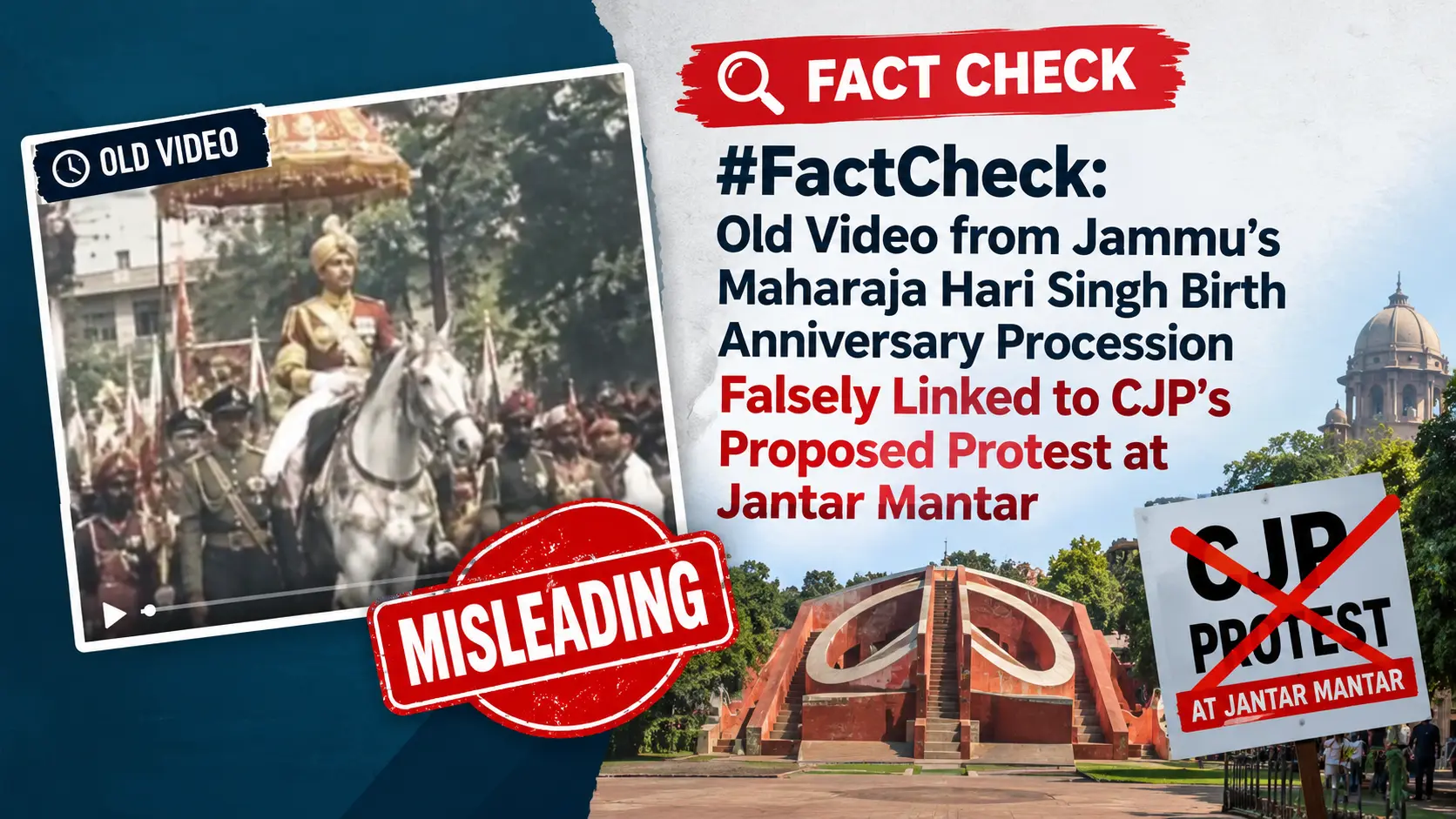
The Cockroach Janata Party (CJP) has called for a protest against Chief Election Commissioner Gyanesh Kumar and a “Chalo Delhi” campaign at Jantar Mantar in New Delhi on Saturday, October 10. Meanwhile, a video is being widely shared on social media showing a large number of people carrying saffron flags and walking on a road. The video is being shared with the claim that the people seen in it are members of Hindu organisations marching towards Jantar Mantar in large numbers to oppose the CJP’s proposed protest. CyberPeace Research found that the viral video is old and shows a procession held at Dogra Chowk in Jammu on the occasion of Maharaja Hari Singh’s birth anniversary.
Claim
A Facebook user shared the viral video with the caption,“News is coming that Hindu organisations have started a movement called the ‘Catch Cockroach Campaign’. Yes, they have given the campaign this name. A large number of people from Hindu organisations are leaving for Jantar Mantar. Brother Deepak... my free advice is... leave for America, because these are very ‘cruel people’ who can change 500 years of history in five hours... Jai Bhawani, Jai Shivaji, now it’s your turn.”The post link, archive link and screenshot are provided below.
https://www.facebook.com/photo/?fbid=1660133012350967&set=a.536762061354740

Fact Check
To verify the claim, we first conducted a reverse image search of a frame from the viral video using Google Lens. Through this search, we found the same video posted on an Instagram page named Rana Ashish Singh on February 21, 2023. However, the post did not provide any information that could help verify the actual origin or context of the video.
https://www.instagram.com/reels/Co61z_zMQr6/

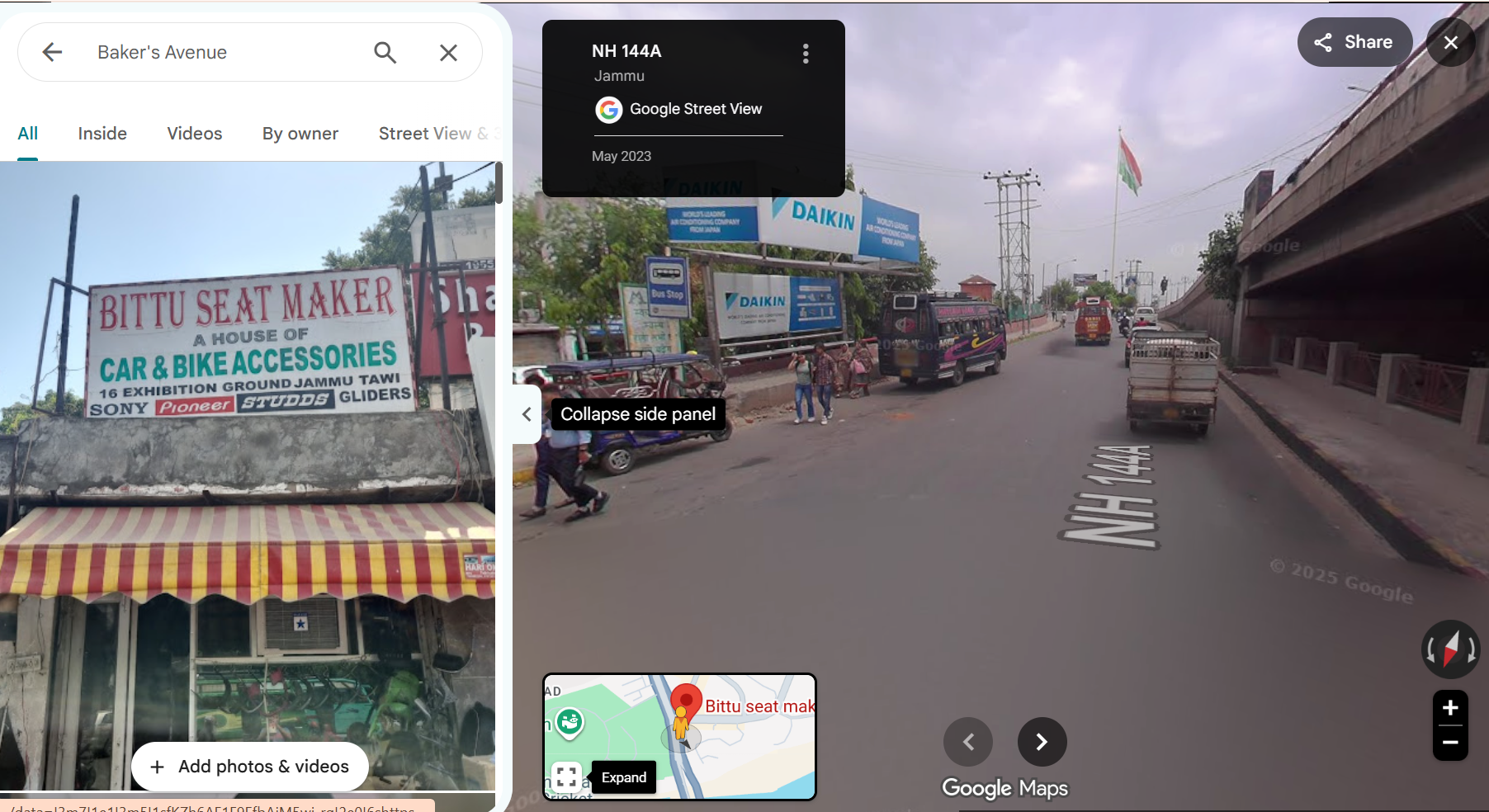
In our further research, we found a higher-quality version of the viral video on the Instagram account ‘@anilgiri4659’, posted in February 2023. On closely analysing the video, we noticed the words “Jai Chandi Maa” written on one of the vehicles, while the number plate of another black vehicle displayed “JK” followed by some digits. We also noticed “Baker’s Avenue” written on the roof of a shop, with a signboard next to it bearing the words “Sport Music” in red. A white building with some black designs painted on it was also visible on the left side of the video. Further into the video, a red-coloured building could be seen. Based on these visual clues, we suspected that the video could be from Jammu and Kashmir.
https://www.instagram.com/reels/CpKOrGkv6SV/
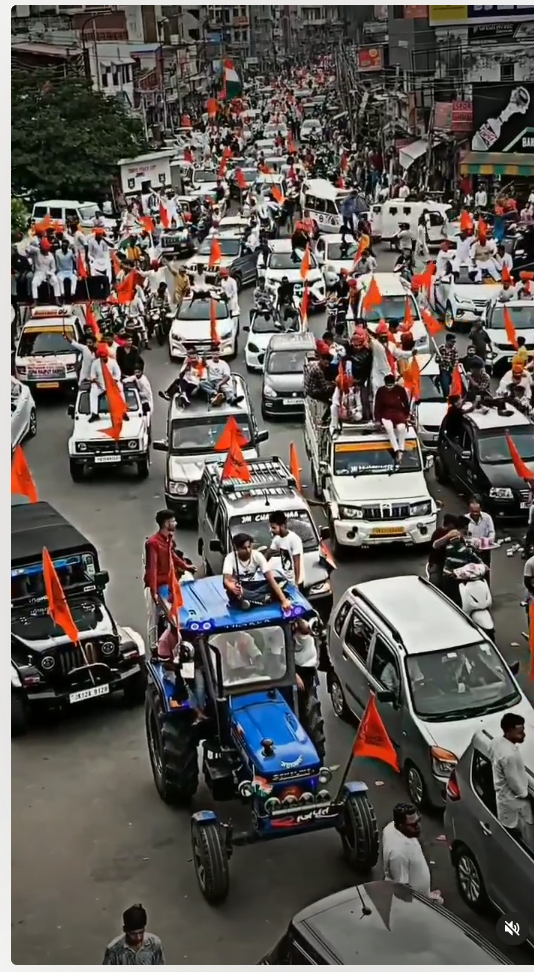
Using these clues, we carried out a geolocation analysis to identify the location and road visible in the viral video. Our research found that the location shown in the viral video is Dogra Chowk in Prem Nagar, Jammu. To further verify this, a comparative analysis of the visuals from the viral video and the corresponding location can be seen in the graphics below.
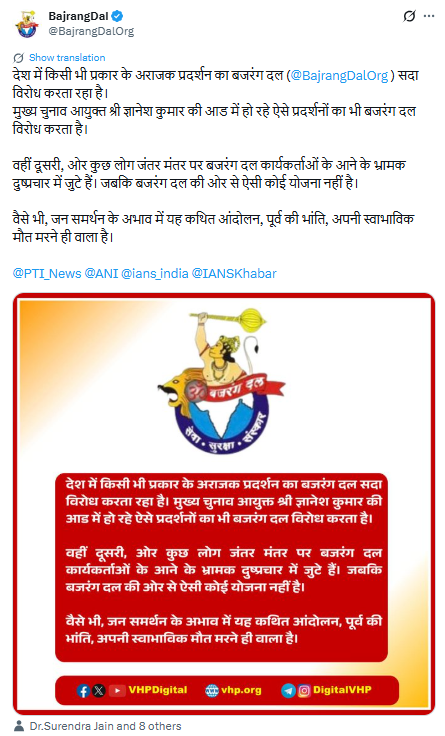
We also found a clarification issued by the official X account of Bajrang Dal regarding the claim that its workers would gather at Jantar Mantar. The post also described the viral claim as misleading and clarified that there is no such plan from Bajrang Dal.
https://x.com/BajrangDalOrg/status/2108059565753536897
Conclusion
CyberPeace Research found that the viral video does not show a protest against Chief Election Commissioner Gyanesh Kumar in Delhi. Instead, it shows a procession at Dogra Chowk in Prem Nagar, Jammu, held in September 2022 on the occasion of Maharaja Hari Singh’s birth anniversary. Therefore, the claim that members of Hindu organisations are marching towards Jantar Mantar to oppose the CJP’s proposed protest is misleading.
