
#FactCheck - "Deepfake Video Falsely Claims Justin Trudeau Endorses Investment Project”
Executive Summary:
A viral online video claims Canadian Prime Minister Justin Trudeau promotes an investment project. However, the CyberPeace Research Team has confirmed that the video is a deepfake, created using AI technology to manipulate Trudeau's facial expressions and voice. The original footage has no connection to any investment project. The claim that Justin Trudeau endorses this project is false and misleading.

Claims:
A viral video falsely claims that Canadian Prime Minister Justin Trudeau is endorsing an investment project.

Fact Check:
Upon receiving the viral posts, we conducted a Google Lens search on the keyframes of the video. The search led us to various legitimate sources featuring Prime Minister Justin Trudeau, none of which included promotion of any investment projects. The viral video exhibited signs of digital manipulation, prompting a deeper investigation.

We used AI detection tools, such as TrueMedia, to analyze the video. The analysis confirmed with 99.8% confidence that the video was a deepfake. The tools identified "substantial evidence of manipulation," particularly in the facial movements and voice, which were found to be artificially generated.


Additionally, an extensive review of official statements and interviews with Prime Minister Trudeau revealed no mention of any such investment project. No credible reports were found linking Trudeau to this promotion, further confirming the video’s inauthenticity.
Conclusion:
The viral video claiming that Justin Trudeau promotes an investment project is a deepfake. The research using various tools such as Google Lens, AI detection tool confirms that the video is manipulated using AI technology. Additionally, there is no information in any official sources. Thus, the CyberPeace Research Team confirms that the video was manipulated using AI technology, making the claim false and misleading.
- Claim: Justin Trudeau promotes an investment project viral on social media.
- Claimed on: Facebook
- Fact Check: False & Misleading

Related Blogs

Executive Summary
A video of yoga guru Baba Ramdev is being shared on social media. The video is accompanied by the claim that Baba Ramdev said the following about Prime Minister Narendra Modi: “Modi ji should now respectfully step down. This is not a favourable time for him, and the coming period will be unfavourable for both the country and him.” In the viral video, he can also allegedly be heard saying, “People had hoped for change, but instead of change, destruction has begun.” A research done by the Research Wing of the CyberPeace found the claim accompanying the viral video to be false. The research revealed that the viral clip is AI-generated.
Claim:
A Facebook user shared the viral video on August 25, 2026, with the caption: **“Modi ji should now respectfully step down. This is not a favourable time for him, and the coming period will be unfavourable for both the country and him. People had hoped for change, but instead of change, destruction has begun.”**
The link to the post, its archive link, and a screenshot are provided below.

FactCheck:
To verify the authenticity of the viral claim, we searched Google using relevant keywords. During the search, we did not find any credible media report corroborating the claim. As part of the research, we also scanned the viral video using the AI detection tool HIVE Moderation. According to the tool’s analysis, there was a 99 per cent likelihood that the voice in the viral video was AI-generated.
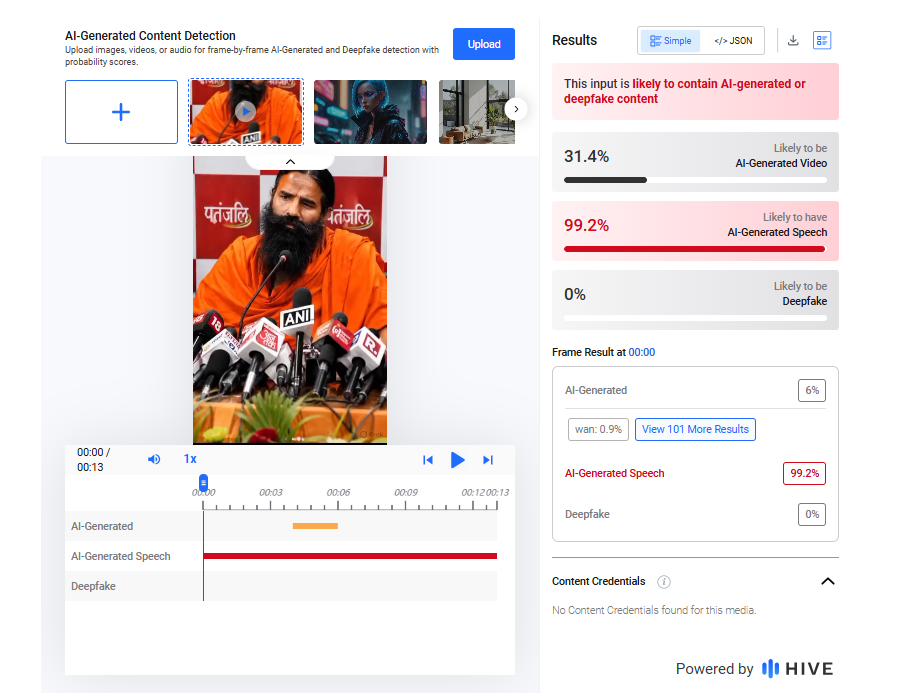
Additionally, we scanned the viral video using another AI detection tool, Detect AI. According to the tool’s analysis, there was a 71 per cent likelihood that the viral video was AI-generated.

Conclusion:
Our research found the claim accompanying the viral video to be false. The research revealed that the viral clip is AI-generated.

Executive Summary
Amid heightened tensions in West Asia following the conflict involving the United States, Israel and Iran, a video showing a large explosion behind a building is being widely shared on social media.
Users claim that the footage shows an Iranian missile strike on a US military base in Kuwait. However, CyberPeace Research Wing research found the claim to be misleading. The viral video is actually from an Israeli airstrike in southern Lebanon. While Kuwait said its air defence systems intercepted missiles and drones during regional hostilities, the viral footage has no connection to any alleged attack on a US base in Kuwait.
Claim
An Instagram user, “indiscope24hr,” shared the video on May 28, 2026, with text overlaid on the clip stating:“Iran launches a deadly missile attack on a US base in Kuwait.”The caption claimed that Iran targeted a US airbase in retaliation for American military action and that Kuwait’s air defence systems were intercepting incoming missiles and drones.

Fact Check
To verify the claim, we extracted key frames from the viral video and conducted a reverse image search using Google Lens. This led us to a post shared on May 28, 2026, by the Instagram account “iltv_israel,” which identified the footage as an Israeli Air Force strike on a Hezbollah target in the southern Lebanese city of Tyre.

Further research found the same footage in a video report uploaded by the New York Post’s YouTube channel on May 28, 2026. According to the report, Israel carried out strikes targeting Hezbollah positions in Tyre, southern Lebanon.

We also found the clip in a video report published by NBC News. The report stated that Israel intensified strikes in southern Lebanon despite an existing ceasefire agreement.


The matching visuals across these reports confirm that the viral footage originated from Lebanon and not from Kuwait.
Conclusion
The viral claim is misleading. The video does not show an Iranian missile strike on a US military base in Kuwait. It actually depicts an Israeli airstrike carried out in the Lebanese city of Tyre on May 28, 2026, and is being shared with a false context on social media.

Introduction
A new dawn in the realm of cyber security and criminal justice is on the horizon. Maharashtra's Deputy Chief Minister, Devendra Fadnavis, has recently announced the advent of the country's most sophisticated cyber lab—a bastion against the dark arts of cybercrime. This announcement, made with the gravitas befitting a statesman, was not merely a bureaucratic note; it was a clarion call to a future where technology and law converge to create a safer society.
The cyber lab, poised to be the largest and most modern of its kind, is not just a facility—it is a symbol of the state's commitment to harnessing the power of technology in the ceaseless battle against crime. Fadnavis, who also holds the state's home portfolio, underscored the significance of this initiative during a function where he also emphasised the need for the Maharashtra police to brace themselves for the enforcement of three transformative criminal laws set to take effect from the first of July 2024.
In compliance with the New Laws
These laws—the Bharatiya Nyaya Sanhita, the Bharatiya Nagarik Suraksha Sanhita, and the Bharat Sakshya Act—They are not mere statutory texts; they are the architects of a new edifice of criminal justice, designed with the mortar of modern electronic and technical evidence to buttress the conviction rates and fortify the legal system.
At the inauguration of the Evidence Management Centre (EMC) and the Evidence Dispatch Van (EDV) in Navi Mumbai, Fadnavis spoke with an air of prescience about the radical shifts these new acts will engender. The EMC, a paragon of innovation with its no-human-intervention ethos, is set to revolutionise the procedure of handling evidence, thereby amplifying the likelihood of securing convictions in an era increasingly marred by cyber frauds and hacking escapades.
Recent Trend
The Deputy Chief Minister's vision extends beyond the present, into a realm where blockchain technology becomes an ally of law enforcement, rendering evidence tampering an obsolete concern. Under the new legislative framework, expert collection of evidence is mandated for crimes with sentences exceeding seven years, a move that underscores the gravity with which digital and electronic evidence is now regarded.
The Cyber Lab
The Navi Mumbai police Commissionerate stands as the vanguard of this new legal era, being the first in the country to align with the upcoming laws. As digital transactions burgeon, so too does the evil of cybercrime. Fadnavis assures us that the cyberlaw, a veritable nexus of modernity, will bring together banks, non-banking financial companies (NBFCs), and social media platforms on a unified platform to detect and thwart crimes with alacrity.
This announcement was made in the presence of Maharashtra's Director General of Police, Rashmi Shukla, and Navi Mumbai's police commissioner, Milind Bharambe, both of whom are key figures in the conception of this project. Their attendance shows the collective resolve of Maharashtra's law enforcement to elevate its capabilities in cybercrime prevention.
Conclusion
The establishment of this cyber lab is a vivid thread woven with the intent to protect the digital integrity of its citizens. It is a testament to the state's foresight and its unwavering commitment to staying abreast of the evolving landscape of crime and technology. As we stand on the cusp of this new era, we are reminded that the fight against crime is perennial, but with such pioneering initiatives, victory is not just a possibility—it is an inevitability.
References
- https://indianexpress.com/article/cities/mumbai/navi-mumbai-cyber-lab-criminal-laws-fadnavis-9206801/
- https://www.the420.in/why-maharashtras-new-cyber-lab-could-be-a-game-changer-for-national-security/
- https://apacnewsnetwork.com/2024/03/navi-mumbai-to-host-indias-most-advanced-crime-busting-lab-boosting-conviction-rates-maharashtra-deputy-cm-fadnavis-announces/
