
#FactCheck: An image shows Sunita Williams with Trump and Elon Musk post her space return.
Executive Summary:
Our research has determined that a widely circulated social media image purportedly showing astronaut Sunita Williams with U.S. President Donald Trump and entrepreneur Elon Musk following her return from space is AI-generated. There is no verifiable evidence to suggest that such a meeting took place or was officially announced. The image exhibits clear indicators of AI generation, including inconsistencies in facial features and unnatural detailing.
Claim:
It was claimed on social media that after returning to Earth from space, astronaut Sunita Williams met with U.S. President Donald Trump and Elon Musk, as shown in a circulated picture.

Fact Check:
Following a comprehensive analysis using Hive Moderation, the image has been verified as fake and AI-generated. Distinct signs of AI manipulation include unnatural skin texture, inconsistent lighting, and distorted facial features. Furthermore, no credible news sources or official reports substantiate or confirm such a meeting. The image is likely a digitally altered post designed to mislead viewers.

While reviewing the accounts that shared the image, we found that former Indian cricketer Manoj Tiwary had also posted the same image and a video of a space capsule returning, congratulating Sunita Williams on her homecoming. Notably, the image featured a Grok watermark in the bottom right corner, confirming that it was AI-generated.

Additionally, we discovered a post from Grok on X (formerly known as Twitter) featuring the watermark, stating that the image was likely AI-generated.
Conclusion:
As per our research on the viral image of Sunita Williams with Donald Trump and Elon Musk is AI-generated. Indicators such as unnatural facial features, lighting inconsistencies, and a Grok watermark suggest digital manipulation. No credible sources validate the meeting, and a post from Grok on X further supports this finding. This case underscores the need for careful verification before sharing online content to prevent the spread of misinformation.
- Claim: Sunita Williams met Donald Trump and Elon Musk after her space mission.
- Claimed On: Social Media
- Fact Check: False and Misleading

Related Blogs

Executive Summary
A video is being widely shared on social media showing a man in an army uniform jumping from a height, losing balance mid-air, and appearing to meet with an accident. The clip is being circulated as a real-life incident. However, a research by the CyberPeace found the claim to be false. The viral video is not real but AI-generated.
Claim
On social media platform Facebook, a user shared the video with a caption suggesting it shows a real accident, warning against risky stunts.
- https://archive.ph/BH6dl#selection-347.0-347.122
- https://www.facebook.com/ashok.yadav.9041083/posts/1593460528549619/

Fact Check
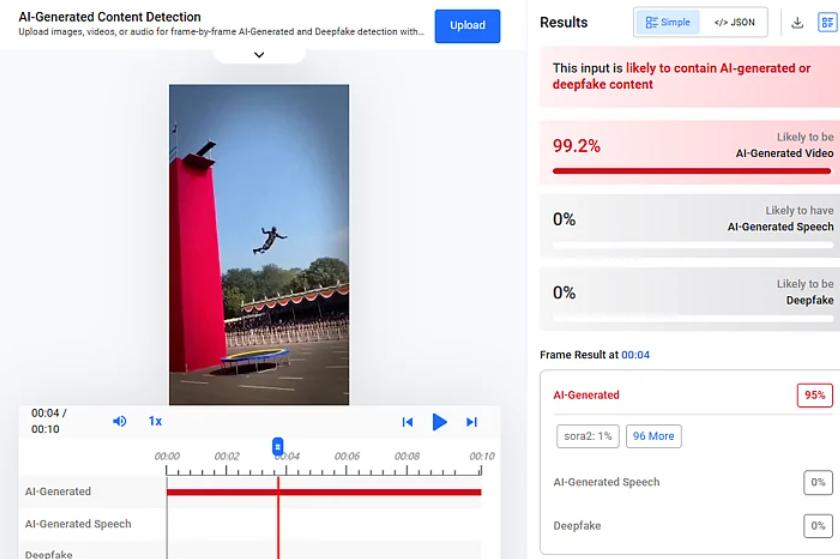
To verify the claim, we conducted a reverse image search using Google Lens but found no credible news reports or official sources mentioning such an incident. A closer look at the video revealed several inconsistencies commonly associated with AI-generated content. For instance, the person appears to disappear momentarily while falling, the head is not clearly visible after impact, and the background audio seems unnatural. We further analyzed the video using AI detection tools. On Hive Moderation, the video showed a 99.2% probability of being AI-generated.
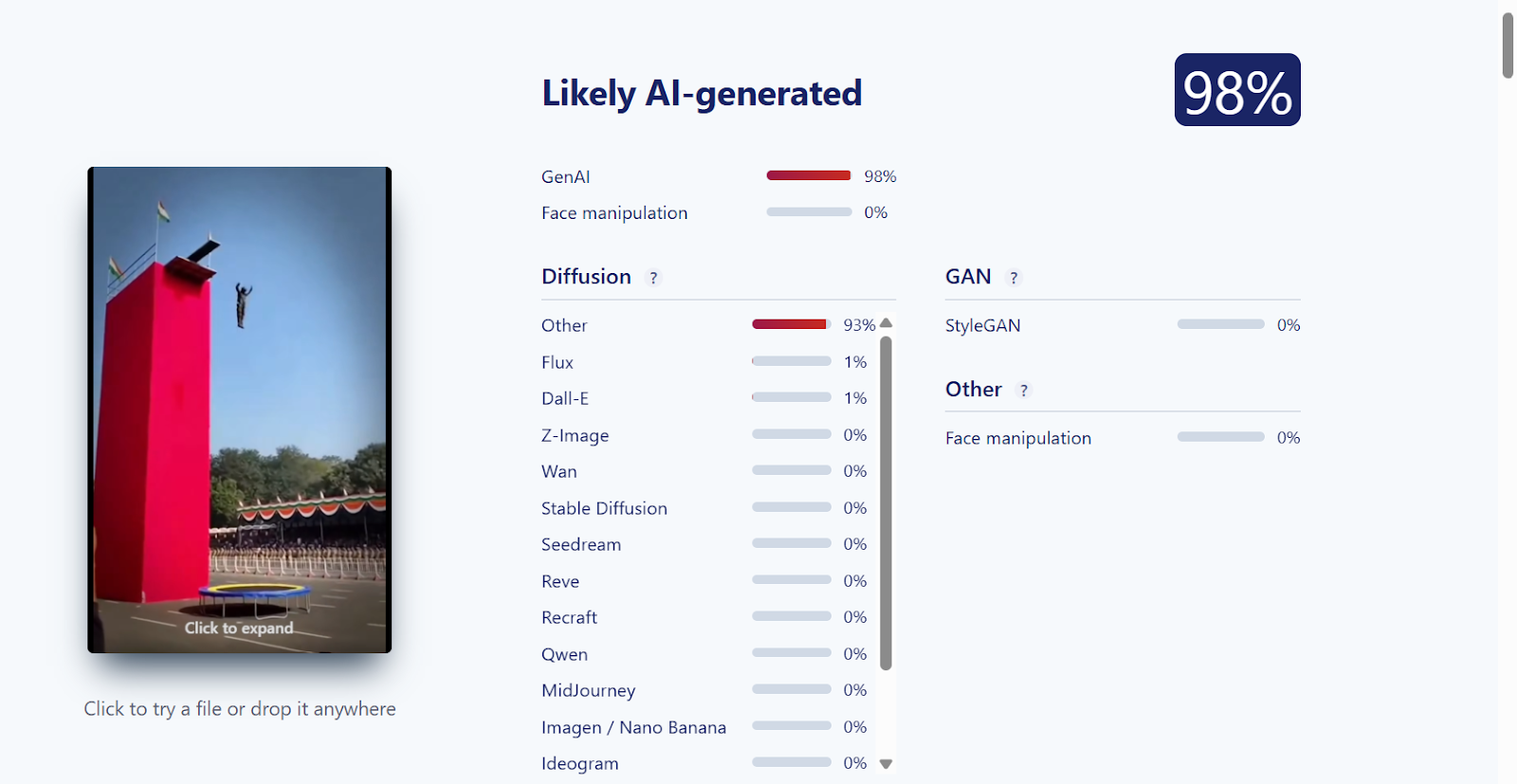
Additionally, analysis using Sightengine indicated a 98% likelihood that the video was synthetically created.
Conclusion
The viral claim is false. The video does not depict a real incident but is an AI-generated clip. It has been shared with a misleading narrative, and there is no evidence to support the claim that it shows an actual accident.

Executive Summary
A video of a young woman without arms performing gymnastics has been widely shared on social media. In the video, the woman can be seen without both arms, yet she performs several difficult gymnastics moves with remarkable ease and confidence. Her impressive physical balance and practice have left viewers amazed. Users sharing the video are praising not only her talent but also her courage, confidence and determination. Many users are also describing it as an inspiring example of overcoming challenges and pursuing one's dreams with unwavering spirit.
However, a probe by the Research Wing of CyberPeace found that the video being shared on social media is not genuine but was generated using Artificial Intelligence (AI). The video shows the young woman performing difficult gymnastics moves with apparent ease, but a technical analysis revealed signs of AI-generated content. Therefore, sharing the video as a real incident or as the performance of an actual gymnast is misleading.
Claim:
A video circulating on social media shows a young woman without arms performing gymnastics, with users hailing her courage and determination.
https://www.facebook.com/reel/1793394471856936

Fact Check
During our research of the viral video, we first conducted a reverse image search of its different keyframes. We also searched Google using relevant keywords. However, we could not find the viral video in any credible media report.
During the reverse search, we found the same viral video on the Instagram account @arenaathletics1, where it was posted on September 13. The post also carries an “AI-generated content” label. The video has garnered more than 20 million views. Several users in the comment section have also identified the video as AI-generated.

We then checked the viral video using the AI detection tool Hive Detect. In its analysis, the tool identified the video as likely AI-generated, assigning it a 93.1 percent score for AI-generated content.
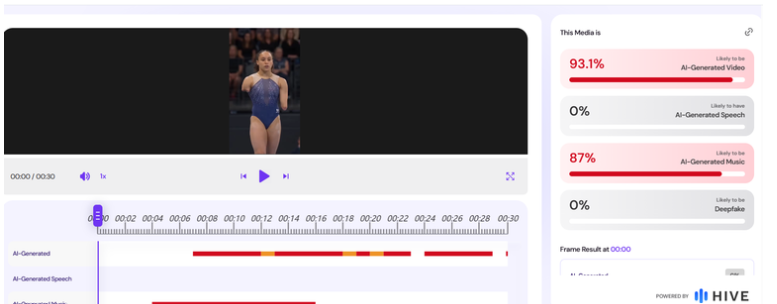
Additionally, six detectors on Deepfake-O-Meter identified the viral video as AI-generated with a high probability.

Conclusion
Our research found sufficient evidence to establish that the viral video showing a young woman without arms performing gymnastics is not genuine. The video was found on an Instagram account carrying an “AI-generated content” label, while analysis using AI detection tools, including Hive Detect and Deepfake-O-Meter, also indicated a high likelihood of AI-generated content. Therefore, the video is AI-generated and is being misleadingly shared as a real-life performance, rather than an authentic video of a gymnast.
.webp)
Introduction
Pagers were commonly utilized in the late 1990s and early 2000s, especially in fields that needed fast, reliable communication and swift alerts and information sharing. Pagers typically offer a broader coverage range, particularly in remote areas with limited cellular signals, which enhances their dependability. They are simple electronic devices with minimal features, making them easy to use and less prone to technical issues. The decline in their use has been caused by the rise of mobile phones and their extensive features, offering more advanced communication options like voice calls, text messages, and internet access. Despite this, pagers are still used in some specific industries.
A shocking incident occurred on 17th September 2014, where thousands of pager devices exploded within seconds across Lebanon in a synchronized attack, targeting the US-designated terror group Hezbollah. The explosions killed at least 9 and injured over 2,800 individuals in the country that has been caught up in the Israel-Palestine tensions in its backyard.
The Pager Bombs Incident
On Tuesday, 17th September 2024, hundreds of pagers carried by Hezbollah members in Lebanon exploded in an unprecedented attack, surpassing a series of covert assassinations and cyber-attacks in the region over recent years. The Iran-backed militant group claimed the wireless devices began to explode around 3:30 p.m., local time, in a targeted attack on Hezbollah operatives. The pagers that exploded were new and had been purchased by Hezbollah in recent months. Experts say the explosions underscore Hezbollah's vulnerability as its communication network was compromised to deadly effect. Several areas of the country were affected, particularly Beirut's southern suburbs, a populous area that is a known Hezbollah stronghold. At least 9 people were killed, including a child, and about 2,800 people were wounded, overwhelming Lebanese hospitals.
Second Wave of Attack
As per the most recent reports, the next day, following the pager bombing incident, a second wave of blasts hit Beirut and multiple parts of Lebanon. Certain wireless devices such as walkie-talkies, solar equipment, and car batteries exploded, resulting in at least 9 people killed and 300 injured, according to the Lebanese Health Ministry. The attack is said to have embarrassed Hezbollah, incapacitated many of its members, and raised fears about a greater escalation of hostilities between the Iran-backed Lebanese armed group and Israel.
A New Kind of Threat - ‘Cyber-Physical’ Attacks
The incident raises serious concerns about physical tampering with daily-use electronic devices and the possibility of triggering a new age of warfare. This highlights the serious physical threat posed, wherein even devices such as smartwatches, earbuds, and pacemakers could be vulnerable to physical tampering if an attacker gains physical access to them. We are potentially looking at a new age of ‘cyber-physical’ threats where the boundaries between the digital and the physical are blurring rapidly. It raises questions about unauthorised access and manipulation targeting the physical security of such electronic devices. There is a cause for concern regarding the global supply chain across sectors, if even seemingly-innocuous devices can be weaponised to such devastating effect. Such kinds of attacks are capable of causing significant disruption and casualties, as demonstrated by pager bombings in Lebanon, which resulted in numerous deaths and injuries. It also raises questions on the regulatory mechanism and oversights checks at every stage of the electronic device lifecycle, from component manufacturing to the final assembly and shipment or supply. This is a grave issue because embedding explosives and doing malicious modifications by adversaries can turn such electronic devices into weapons.
CyberPeace Outlook
The pager bombing attack demonstrates a new era of threats in warfare tactics, revealing the advanced coordination and technical capabilities of adversaries where they have weaponised the daily use of electronic devices. They have targeted the hardware security of electronic devices, presenting a serious new threat to hardware security. The threat is grave, and has understandably raised widespread apprehension globally. Such kind of gross weaponisation of daily-use devices, specially in the conflict context, also triggers concerns about the violation of International Humanitarian Law principles. It also raises serious questions on the liabilities of companies, suppliers and manufacturers of such devices, who are subject to regulatory checks and ensuring the authenticity of their products.
The incident highlights the need for a more robust regulatory landscape, with stricter supply chain regulations as we adjust to the realities of a possible new era of weaponisation and conflict expression. CyberPeace recommends the incorporation of stringent tracking and vetting processes in product supply chains, along with the strengthening of international cooperation mechanisms to ensure compliance with protocols regarding the responsible use of technology. These will go a long way towards establishing peace in the global cyberspace and restore trust and safety with regards to everyday technologies.
References:
1. https://indianexpress.com/article/what-is/what-is-a-pager-9573113/
5. https://www.theguardian.com/world/2024/sep/18/hezbollah-pager-explosion-lebanon-israel-gold-apollo
